
I’m sure there are, now roughly a week and a half away from expiration, a million articles on Secure Boot, what to do about it, when it’s happening, etc. So, I have been very reluctant to publish an article on the topic as it feels like just adding to the pile.
However, I continue to be very frustrated with this topic, as I continue to see a lot of “information” going around that’s not helping at all. I am not an industry expert on this topic, but it doesn’t take an expert to notice something stinks when multiple people are yelling conflicting information, providing information that disagrees with first-party information, or making claims that… I just don’t see how it aligns with what is, again, first-party information.
To give an example – there was a speaker at MMS MOA claiming devices wouldn’t boot AT ALL anymore once the cert expires. I’m talking about being bricked, requiring some sort of manual desk-side intervention to get it working again. This was in a line of questioning I was asking, and I made sure to repeat the claim back and get it confirmed. That scared the room, and people quickly jumped to say Microsoft’s information said otherwise. And indeed, that claim was later refuted thoroughly by others speaking during the actual Secure Boot panel, and Microsoft’s own articles disagree quite clearly. But I still keep hearing this claim!
There were other claims made at MMS that devices would stop receiving Windows updates, meaning that they would quickly become insecure, which is technically sort of true but also not true in the “oh my god no monthly security updates?!?!” way that people seem to interpret and spread belief on this on.
I’ve had frustration with Microsoft directly, though, whose policies, explanations, data, and real-world CURRENT results on this topic are… not good (we’ll get to it in detail).
The thing that finally sent me over the edge was an email from a vendor on Thursday that, to quote, said, “On June 25th, the first batch of Secure Boot Certificates will expire. Unresolved, the aftermath (devices that did not update their cert) will involve a lot of in-person updates, which, in the age of remote work, could be a very expensive and time-consuming process.”
I like to think I’m not an idiot, but despite spending a month going down this rabbit hole, I cannot connect the dots on that claim (a requirement to go in-person / direct-access to fix something) to all the information I know and can quote from Microsoft directly. That again seems to echo this claim that some level of work-stopping break will occur and that it will require desk-side IT to correct something to get them back up and running, a claim which Microsoft has in plain writing saying will NOT happen, as I will soon show.
If, on the off chance, that vendor reads this, I don’t mean any offense. Perhaps the vendor meant resolving something else, something reasonable, like helping with firmware updates, which can block secure boot cert updates. But their email gives zero explanation as to what their offered service is, how the claimed issue could occur, how they help prevent it, etc. So, I can’t explain the email. Key to my concern and why this bothers me: I don’t think ANYONE (who doesn’t already know better) can reasonably read that statement and come away with anything other than the belief of “oh my god, if we miss this secure boot update stuff must break really badly!”, so it results in bad education and continued spread of misinformation. In the end, it feels like someone got carried away while writing that marketing email and really went hard into the urgent call to action by keeping the specifics vague and just putting a link to learn more – my phishing training is tingling!
In this article I will cover:
- What does Microsoft actually say?
- Microsoft’s Reporting:
- Why Is My Device Not up to Date?
- “High Confidence” and How to Get Around It:
- PowerShell Intune Remediation Script for Further Monitoring:
What Does Microsoft Actually Say?
Here is the gospel you should actually follow, straight from Microsoft: Windows Secure Boot certificate expiration and CA updates
That is a multi-section and multi-part article that answers a lot of burning questions folks have.
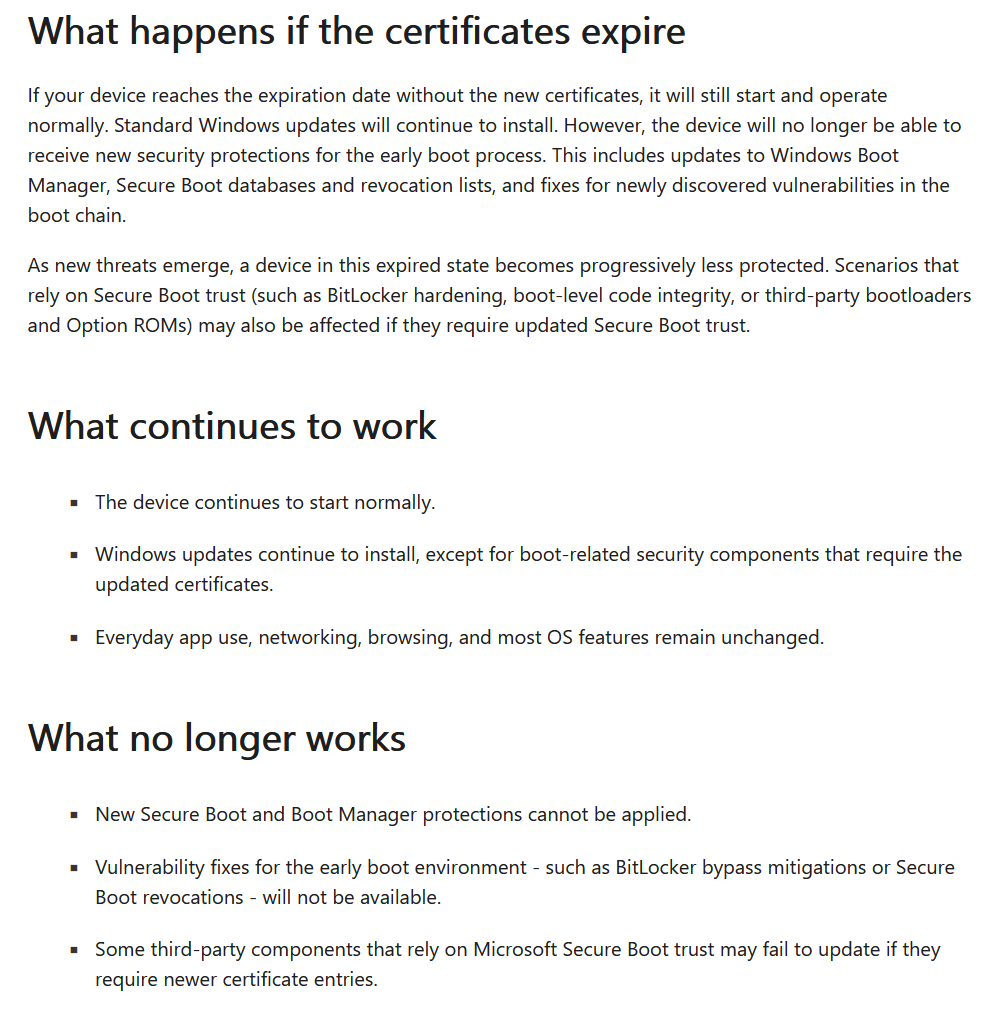
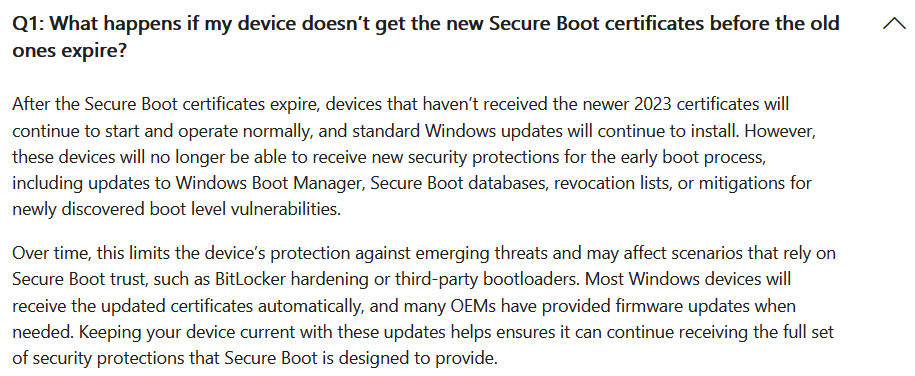
Of utmost concern, straight from the horse’s mouth, what happens if they expire:
And here again.
And also, post-expiration (see here):
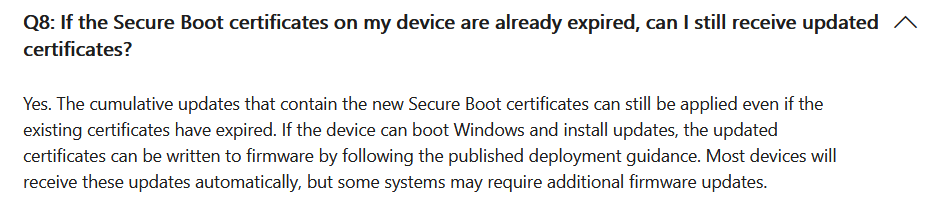
Is there a security concern here? Yes. Should you do everything you can to be up to date? Yes. Are people’s devices going to brick, requiring hands-on access to correct, and blowing up companies that failed to update, like the late coming of Y2K? According to Microsoft themselves, very clearly, NO!!!
To say it one more time – as Microsoft just has been screaming – devices that don’t update won’t brick. They will still boot. They will still “work” from an employee’s perspective. And, for whatever reason, if they missed the update*, they will, again, still be able to boot, as well as install the update.
I’m not going to continue to blabber and basically repeat a bunch of the FAQs already in that second link. Odds are, if you have a concern, it’s already answered in those very detailed articles, granted a lot of key information feels very scattered (that’s part of why I’m writing this). But I hope this answers the most burning question and makes it quite clear that, at least from what Microsoft themselves says, this is not the end of the world if a device doesn’t have this update in time.
*I will highlight one important reason I wanted to make this clear is because of sitting inventory. If your company has 500 devices sitting in boxes in a warehouse waiting to be assigned to an employee, they might not have gotten this update yet if they were bought 7 months ago and haven’t booted again since. If these false claims of bricking were true, holy crap, you’d need to go unbox them right now and update them ASAP, or things would get really rough for all sitting inventory here shortly. That was part of my questioning at MMS MOA, and a speaker tried to claim that yes, those devices would not continue to work, would not boot, and the room was quite upset by that claim. Again, though, that was later refuted, and Microsoft’s own articles, as you just saw, clearly indicate those devices will neither be bricked nor incapable of updating.
Microsoft’s Reporting:
That out of the way, part of the reason I decided to go ahead and write this article was that Microsoft’s reporting is not, and prepare for a shock, perfect.
If you don’t know, for those with Autopatch, in Intune under Reports, Windows Quality Updates, change to the Reports tab, you will find a “Secure Boot Status” report. This report was initially so bad they had to recall it and ended up publishing a new version during MMS MOA. I do like this new report, as it gives clear information on important factors.
I don’t like this report because it does not explain half of those important factors, let you export this information to compare to other data, or give you much of an answer as to why something has or has not moved forward. Annoyingly, those answers are out there, largely in that same huge Microsoft article I linked above, but whoever entered the information bubble answers on this report really didn’t feel like doing work that day to make it easy to understand, I guess. Instead, you’ve got to find that article and sift through it to make sense of this report. Let me help with that.
To get into this requires its entire own section.
Why Is My Device Not up to Date?
There are a few major reasons behind this. Microsoft does have a great article on this, the same one I keep linking to, but I want to highlight the major ones and add some more information I now know.
First, Secure Boot itself.
Going back to the same Secure Boot Report menu, I’m going to highlight that there is a Secure Boot column. All it says, even under the information header, is “Secure Boot Enabled” with no explanation of how important that yes or no really is. I almost gave Secure Boot enablement its own section because of how much information is hiding here.
- No, secure boot is not required for Windows 11. Secure boot capable is required for Windows 11. So yes, you can have devices with Secure Boot disabled that are functioning, from a user perspective, completely without issue. See https://www.microsoft.com/en-us/windows/windows-11-specifications.

- Devices with Secure Boot off will NOT patch their Secure Boot certificates. See here under “Q6: What is the impact on devices with Secure Boot disabled?”

- Fun fact, devices with Secure Boot disabled also won’t get firmware updates, including BIOS/UEFI updates, through Autopatch. Devices without an up-to-date enough BIOS/UEFI cannot update their secure boot certs. This is an undocumented requirement that the Autopatch team basically commented on by saying that having Secure Boot disabled was an unsupported scenario… which makes the next point interesting. Before I move on, though, once Secure Boot is enabled, even if the firmware update is already approved, the device will have to sit through the driver deferral length for its ring before it will perform the update.
- Not all devices will qualify for this update by design. For example, Windows 365 / Microsoft Cloud PCs born during the first year or two of that product’s existence don’t support Secure Boot, and thus do not have it enabled. I guess Microsoft doesn’t support their own devices then, eh? (see above comment).
But seriously, there’s no point in worrying about the Secure Boot certs on a device with Secure Boot disabled. It’s like worrying about the certificate your website uses when accessed via HTTPS… but only allowing folks to connect via plain-text HTTP. The cert is not in use; it doesn’t matter.
That said, obviously, you do need to see if it makes sense to enable Secure Boot, and the general recommendation is to always do that when possible.
If Microsoft is truly correct, though, it sounds like today enabling Secure Boot has an immediate securing effect, but tomorrow that securing effect won’t take place until the device also has time to then pull down updated certs, assuming it didn’t already get them at some prior point.
Second, UEFI/BIOS version.
Annoyingly, I cannot clearly cite Microsoft’s articles on this. There is a mention of how there might be something “wrong” with the firmware if you aren’t getting an update, but I don’t see a super clear noting like “by the way, your vendor may need to put out a BIOS/UEFI update to make this update possible.” But yes, as thoroughly confirmed by Microsoft at MMS MOA, and complained about by many folks in the audience who kept mentioning HP, you may need firmware updates to enable you to then get the cert updates in full.
If your firmware is not relatively up to date, update it. That should be happening automatically through Windows Updates. Although again, keep an eye on Secure Boot as if it’s off, Autopatch won’t send BIOS/UEFI updates. Once that is corrected, even if the firmware update is already approved, the device will have to sit through the driver deferral length for its ring before it will perform the update.
If your vendor has not yet pushed the update to enable this, first of all shame on them, and second of all, good luck! Seriously though, Secure Boot is just going to not work on your devices, and you’re not going to be in a great spot security-wise because of that.
Fourth, Microsoft’s “High Confidence” rollout, which I have to give it’s own section.
“High Confidence” and How to Get Around It:
Going back to that Secure Boot report, there is a column talking about some confidence level with no explanation. It kind of looks like High Confidence signals the confidence that a device is up to date now, as I only ever see it listed by an up-to-date device, but that’s backwards to what it’s trying to say / what happened.
In simple terms, high confidence is actually Microsoft saying, “We have high confidence based on shared diagnostic data from this device (make, model, firmware version, update version, etc) that it will succeed at this cert update without issue; therefore, we will go ahead and push this update.” So if they don’t have high confidence in that combination, they haven’t opened that gate yet.
That sounds great and all, but we are around a week and a half from the certs expiring, and I’ve become aware of folks dealing with Microsoft Surface Laptop 3s and 4s that just aren’t moving forward due to a lack of established high confidence, despite efforts to ensure all else is right… I lack the words. To be clear, some SL3s and SL4s have moved forward, indicating there isn’t some stupid missing puzzle piece here, while many others have not, and nobody can explain why.
To credit sources here as best as possible for the above explanation of the confidence level, that same article has this section for IT pros/orgs stating…
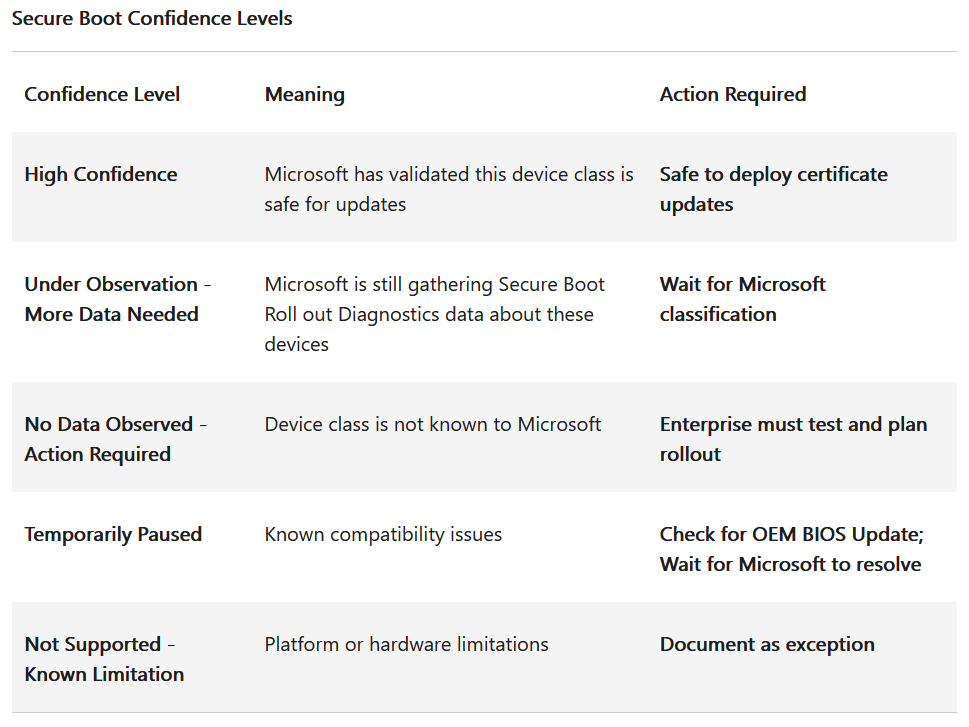
Although there’s not really any further explanation to help this chart make more sense, shame on Microsoft.
Okay, so how do you get around this?
First, before trying to get around this safety net, I want to note that I have heard claims that this confidence level can have issues if you don’t make efforts to enable diagnostic data sharing with Microsoft. This is the same data sharing that also helps enable firmware updates, Intune reporting, etc. And, that does seem to hold some water as diagnostic data is mentioned in their article. Diagnostic Data is also required for the workaround itself to work, so you’re going to have to set this up regardless.
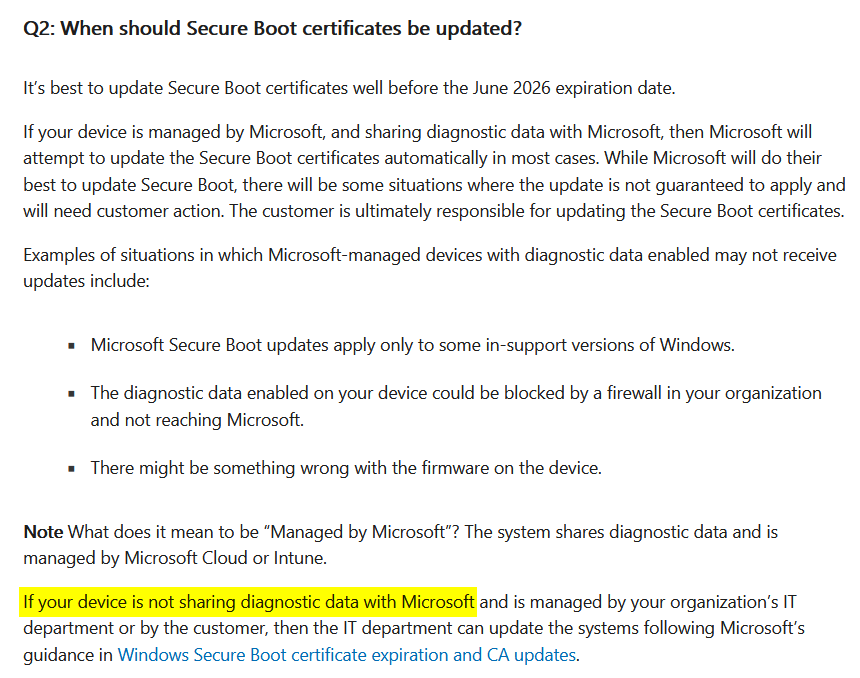
That said, unfortunately, if Microsoft has yet to declare your devices as “high confidence” to enable them to move forward, you don’t have much of a choice other than to either let time continue to burn and pray that Microsoft opens that gate (or you find some other roadblock) before the deadline and that devices have enough time to then complete that action once the gate is opened, or, open the gate yourself.
To do that, you can opt out of high confidence, enabling updates to move forward regardless. Their articles mention doing this through registry keys, but there is a much easier way.
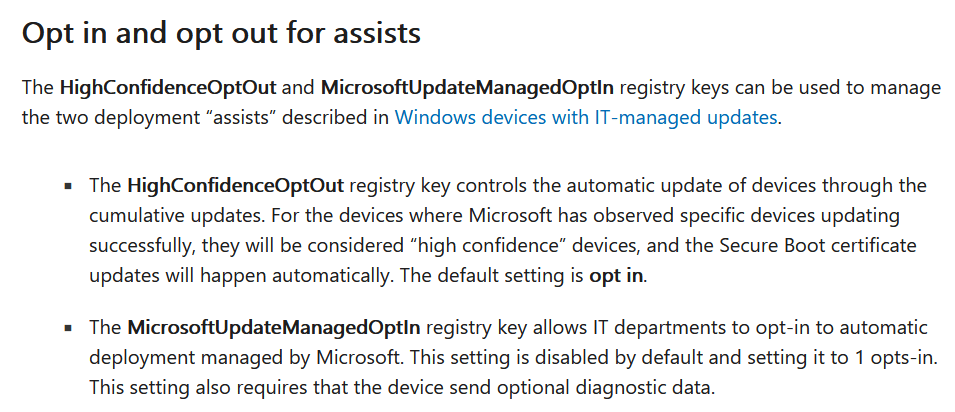
Instead, you can configure a simple configuration profile.
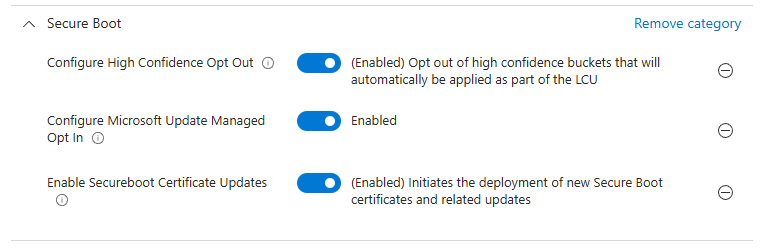
This…
- Opts out of high confidence, enabling devices without that full backing to attempt to move forward
- Opt in to the Microsoft CFR (this is the MicrosoftUpdateManagedOptIn key mentioned above). Again, as mentioned in the prior image talking about the two keys, you NEED to enable Diagnostic Data.
- Enable Secure Boot Certificate Updates. Setting this to Enabled causes the new Secure Boot certificates to be installed and installs the 2023 signed boot manager for all devices where the policy is applied.
Once applied, I have now watched hundreds of devices move forward so far without anyone noticing anything, including no reports of issues. I will also note that devices complete the updates in full VERY quickly, often within 24-48 hours. That said, we are doing a very controlled rollout, not because we wanted to control that rollout so tightly, but because this “opt out” of “high confidence” at least implies there is some lack of confidence in what we are doing. But it’s June 13th; this needle needs to move regardless of whatever arbitrary confidence is stalling on Microsoft’s side.
So, obviously, test, be careful, be aware, treat different models differently, review whatever information the Secure Boot Report has to offer, especially for devices that are anything other than “High Confidence” and “Under Observation”, as the only options besides those are extra concerning. And check this out for help on model-specific rollouts.
PowerShell Intune Remediation Script for Further Monitoring?
Much to my confusion, something I had to stumble upon myself rather than anyone mentioning it, was this lovely gem of a monitoring script for better understanding what devices are doing and where they are status-wise. Check out Microsoft’s article on Monitoring Secure Boot certificate status with Microsoft Intune remediations.
I ended up using this to better understand what devices were and were not up to date. Honestly, this script somewhat nullifies the point of the Secure Boot report, as it provides mostly the same information, additional information, and is exportable. Try it out!
Update 7/10/26:
The proof is in the results, and indeed, the world did not end, nor has anything come up since on my radar.
Conclusion:
I hope some folks find this useful. I know it’s rather late in the game to be commenting on this topic, but one too many interesting comments have been hitting my radar, along with annoyance at Microsoft for devices like Microsoft’s own hardware that have yet to be declared high confidence, made me go ahead and put this out there.
Disclaimer:
The following is the disclaimer that applies to all scripts, functions, one-liners, setup examples, documentation, etc. This disclaimer supersedes any disclaimer included in any script, function, one-liner, article, post, etc.
You running this script/function or following the setup example(s) means you will not blame the author(s) if this breaks your stuff. This script/function/setup-example is provided AS IS without warranty of any kind. Author(s) disclaim all implied warranties including, without limitation, any implied warranties of merchantability or of fitness for a particular purpose. The entire risk arising out of the use or performance of the sample scripts and documentation remains with you. In no event shall author(s) be held liable for any damages whatsoever (including, without limitation, damages for loss of business profits, business interruption, loss of business information, or other pecuniary loss) arising out of the use of or inability to use the script or documentation. Neither this script/function/example/documentation, nor any part of it other than those parts that are explicitly copied from others, may be republished without author(s) express written permission. Author(s) retain the right to alter this disclaimer at any time.
It is entirely up to you and/or your business to understand and evaluate the full direct and indirect consequences of using one of these examples or following this documentation.
The latest version of this disclaimer can be found at: https://azuretothemax.net/disclaimer/

