

Here is an interesting one. If you go into Word/Excel/PowerPoint/ETC – there is an option under Save As, Add a Place which has a multitude of 3rd party site options you can use to connect Office apps directly to those locations. As of writing I see Box, Egnyte, OpenText Content Cloud, and ShareFile (Beta).
I had to look into this recently and found no shortage of folks looking for answers on how to block these options, but nobody really seemed to have an answer. I found some old registry keys that didn’t work, and the names of old policies which no longer seem to exist (primary information was surrounding Office 2013). I eventually did figure it out and figured I would make the answer available to all those on the web. So, how do you do this?
In this article we will cover…
- Intune Settings Catalog to the Rescue!
- What About Personal OneDrive?
- Conclusion
Intune Settings Catalog to the Rescue!
It’s actually pretty simple, they have a policy for it.
Note: If you don’t have Intune, I am sure there is a way to do this via Group Policy (likely the same setting) or a registry key if it comes down to it although, you may need to import ADMX templates to get this to work as expected.
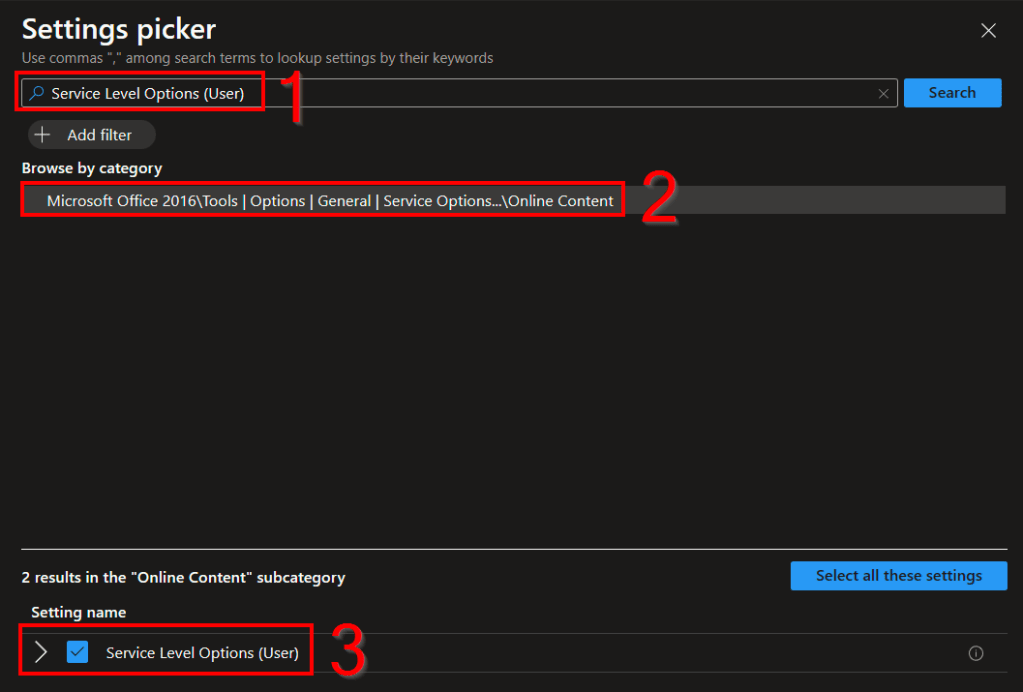
If you are using Intune, just create a new Settings Catalog and look for a setting named Service Level Options (User). You will need to click the singular category result, then check the box for the setting.
Here is the full wording of the policy for those interested (hover over the i logo)…
This policy setting controls the types of services that can be used by the online features of Office 2016. If you enable this policy setting, you can choose one of three options for gating access to online services based on the owner of the service: * Office services only – Office 2016 applications on the computer communicate only with Office-owned services. All other Microsoft or third-party service integration in Office 2016 is disabled on the computer. This is the most restrictive option. * Microsoft services only – Office 2016 applications on the computer communicate only with Microsoft-owned services. All third-party service integration in Office 2016 is disabled on the computer. * All services – All service integration in Office 2016 is enabled on the computer. This is also the default configuration. If you disable or do not configure this policy setting, Office 2016 client applications allow all service integrations. Individual users can manage the set of services they use through the new My Office place in Office Backstage view.
In short though, if you want to block the 3rd party offerings, just set it to Enabled and Microsoft Services Only. I really love all the double negatives in policy but what this is doing is saying to restrict the offerings in Office to only those owned by Microsoft (1st-party) such as OneDrive. Thus, all the 3rd-party options are removed.
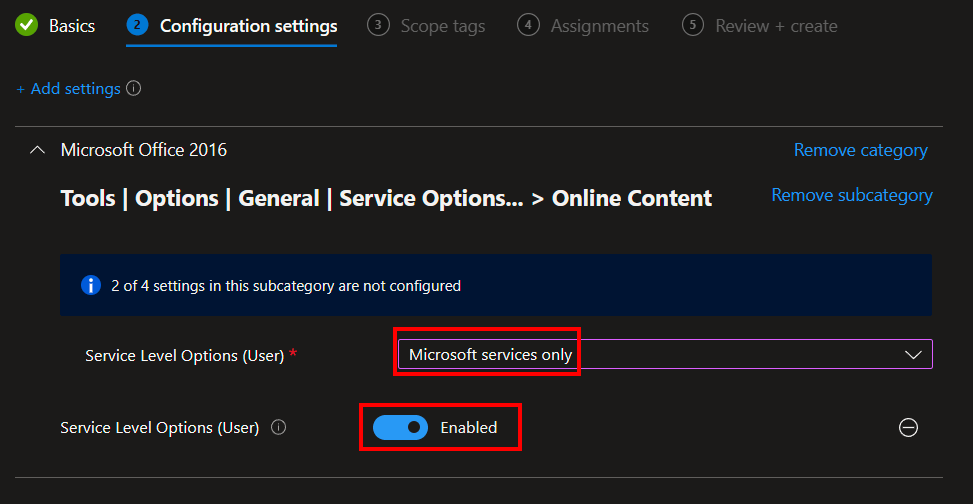
From there you can scope it as needed.
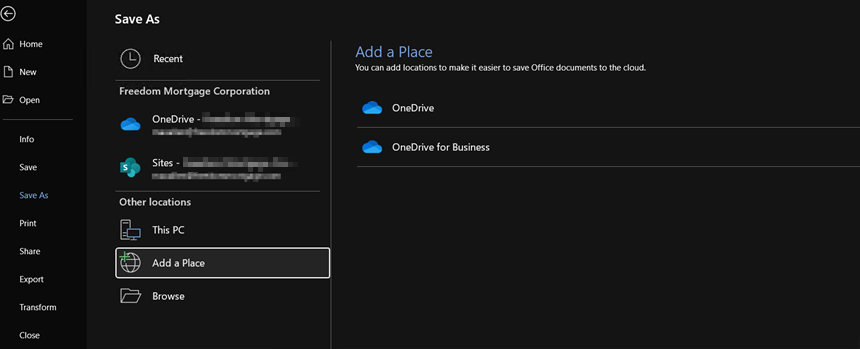
You may need to restart individual Office apps for it to apply but, once it does, that same Add a Place menu will appear like this. The 3rd-party options are now gone!
What About Personal OneDrive?
A question I am sure someone will wonder and one which makes sense to ask. The answer is, you don’t want to try and kill it from this menu. Rather, you need a separate policy setup to disable it globally on your devices.
That setting is named “Prevent users from syncing personal OneDrive accounts (User)” and it does just that.
This setting lets you block users from signing in with a Microsoft account to sync their personal OneDrive files. If you enable this setting, users will be prevented from setting up a sync relationship for their personal OneDrive account. Users who are already syncing their personal OneDrive when you enable this setting won’t be able to continue syncing (and will be shown a message that syncing has stopped), but any files synced to the computer will remain on the computer. If you disable or do not configure this setting, users can sync their personal OneDrive accounts.
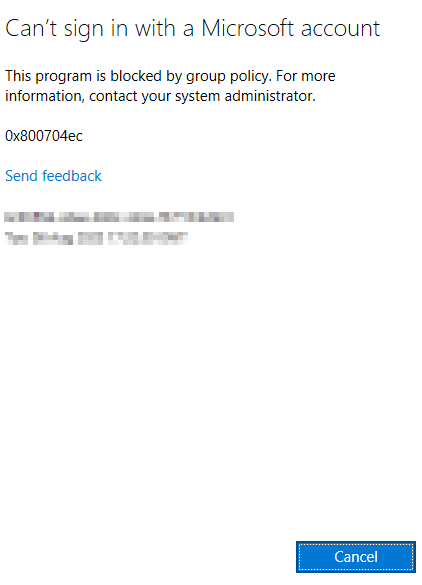
Once setup, if someone tries to hit the OneDrive option in the Add a Place menu, then enters a personal email like a yahoo or Hotmail (which could be associated to a personal OneDrive account), they will get this message. This also applies to other locations like trying to sign into a OneDrive personal account directly in OneDrive. I don’t believe it impacts browsers though.
Conclusion:
Hopefully, you now have the knowledge needed to plug this hole. Happy policy’ing!
Disclaimer:
The following is the disclaimer that applies to all scripts, functions, one-liners, setup examples, documentation, etc. This disclaimer supersedes any disclaimer included in any script, function, one-liner, article, post, etc.
You running this script/function or following the setup example(s) means you will not blame the author(s) if this breaks your stuff. This script/function/setup-example is provided AS IS without warranty of any kind. Author(s) disclaim all implied warranties including, without limitation, any implied warranties of merchantability or of fitness for a particular purpose. The entire risk arising out of the use or performance of the sample scripts and documentation remains with you. In no event shall author(s) be held liable for any damages whatsoever (including, without limitation, damages for loss of business profits, business interruption, loss of business information, or other pecuniary loss) arising out of the use of or inability to use the script or documentation. Neither this script/function/example/documentation, nor any part of it other than those parts that are explicitly copied from others, may be republished without author(s) express written permission. Author(s) retain the right to alter this disclaimer at any time.
It is entirely up to you and/or your business to understand and evaluate the full direct and indirect consequences of using one of these examples or following this documentation.
The latest version of this disclaimer can be found at: https://azuretothemax.net/disclaimer/

