
I recently stumbled upon an interesting pair of Windows issue while working on this project, both pertaining to the Windows 11 Notifications menu. One of them has been identified in the past but the information I found pertained to Windows 10 where the issue isn’t as bad. For that reason, I thought it worth talking about.
What’s the Problem?
The first one I noticed stems from the three dots that show on a toast nonfiction and clicked on it to see what it did, fearing it was a way to silence them which would be a problem for the project. Sure enough, it was. So, to see what happens, I clicked it.

I then had a realization of “oh crap, how do I turn it back on?”
I went looking in the Settings menu and couldn’t find anything pertaining to app notifications. I was absolutely dumbfounded, I knew Windows 10 had a notifications menu, where in the world had they moved it in Windows 11??
I eventually found my way to this button you get when right clicking the clock / notification tray (whatever they call it now). Guess what, it doesn’t do anything! Nothing would open when I clicked it.

And I found this button too, which proved equally useless.

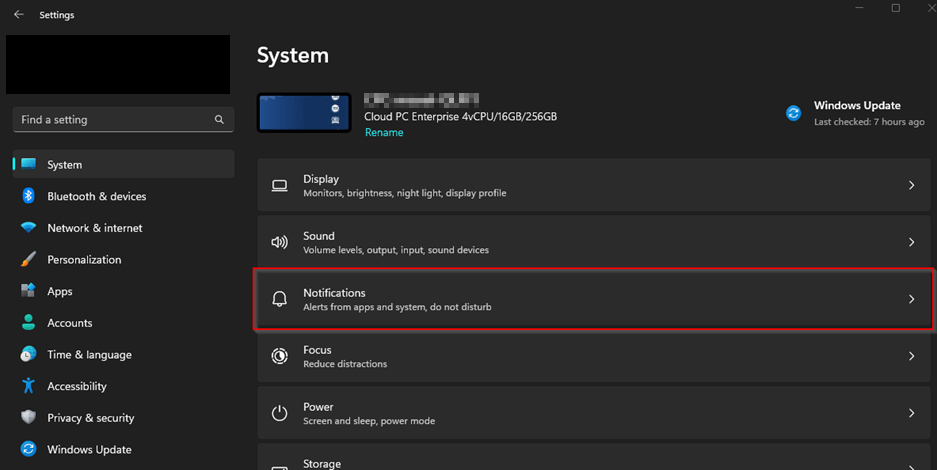
I eventually started Googling and confirmed that there indeed should be a Notifications menu inside the System menu of Windows 11. Here is what I should be seeing…
Yet this is what I see… (Edit from 2025, two years later, this screenshot is wrong. What I saw was NO “Notifications” menu in the list)
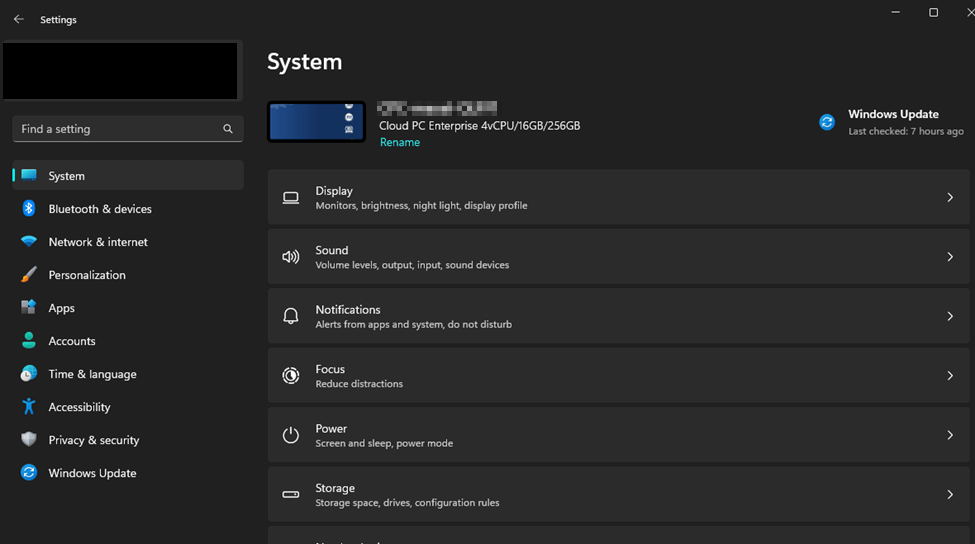
What is going on here?
The problem is a bit confusing. This is coming from Intune policy. Strangely, it’s coming from a Deice Restriction Profile someone has configured in your organization with the setting Block Gaming set to Block.

How on earth does that make sense? Well, it all comes down to what this setting does, and how the Settings menu works.
This setting drops in a registry key, as most policy does, named PageVisibilityList. The key is then filled with the various pages to hide. When you use this policy configured in this manner, it sets the values….
hide:gaming-gamebar;gaming-gamedvr;gaming-broadcasting;gaming-gamemode;gaming-trueplay;gaming;xboxnetworking;quietmomentsgame
And the culprit is quietmomentsgame. This setting controls the visibility of this silly checkbox.
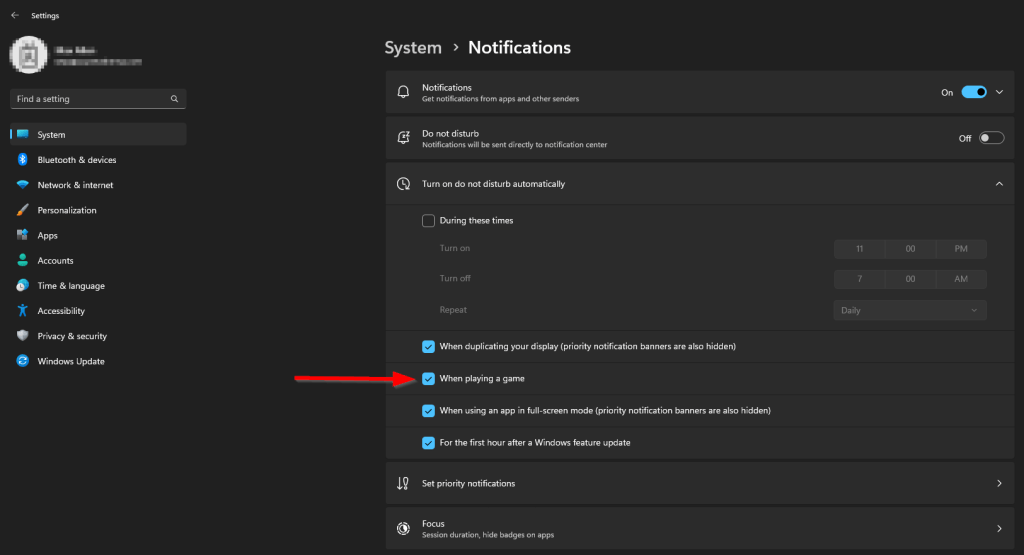
In Windows 10, this setting lived inside of the Focus Assist menu. When you used this same policy in this same manner, you actually lost the Focus Assist menu as a whole. The thing was, nobody really used that menu, so nobody really noticed. Sure enough, it was missing in my organization’s Windows 10, and nobody had noticed for years until I went looking for it as a result of my findings on this problem.
In Windows 11, the Focus Assist menu was rebranded to simply Focus and some settings, including that checkbox, were moved inside the Notification’s menu.
After talking with Microsoft support, they can only block Level 1 (menus like System) and Level 2 (menus like Notifications) Settings menu’s. If you configure a policy to block a level 3 (or advanced) menu such as this checkbox, you actually cut off the whole level 2 menu. Thus, no more Focus Assist, or for Windows 11 the whole Notifications menu.
What is the Solution?
It’s actually fairly simple. You need to turn that setting in your Device Restriction Profile to not configured.
Then, create a custom policy and use the following settings for the OMAURI.
Name: Hide Gaming Menu
Description: Hide Gaming Menu In Settings App
OMA-URI: ./Device/Vendor/MSFT/Policy/Config/Settings/PageVisibilityList
Type: String
Value: hide:gaming-gamebar;gaming-gamedvr;gaming-broadcasting;gaming-gamemode;gaming-xboxnetworking
This sets that same registry key but, note the lack of our quietmomentsgame problem portion. That check box will continue to show there, but the rest of the gaming menu will vanish without costing you the whole Settings Menu.
Is Microsoft Aware?
Yes, I actually ended up contacting Microsoft about this problem as most of the articles I found regarding it were to do with Windows 10, where the issue isn’t so bad.
I expressed to them they should re-evaluate the seriousness of this bug since in Windows 11 it knocks out the entire Notifications menu, rather than just the Focus menu. And, in my opinion, the Notifications menu is much more important that the Focus or Focus Assist menu. Why not put this check box back the Focus menu?
Unfortunately, that didn’t seem to get much traction. They do not (as of February 2023) have an ETA for when they will fix this. Considering it’s been known about for years, don’t expect a solution anytime soon.
If you need to contact them over this topic, reach out to the Intune support team and refer to the bug numbers ICM: 123424643 /// 119051913.
I am sure if everyone emailed them, they would get this fixed sooner.
Disclaimer
The following is the disclaimer that applies to all scripts, functions, one-liners, setup examples, documentation, etc. This disclaimer supersedes any disclaimer included in any script, function, one-liner, article, post, etc.
You running this script/function or following the setup example(s) means you will not blame the author(s) if this breaks your stuff. This script/function/setup-example is provided AS IS without warranty of any kind. Author(s) disclaim all implied warranties including, without limitation, any implied warranties of merchantability or of fitness for a particular purpose. The entire risk arising out of the use or performance of the sample scripts and documentation remains with you. In no event shall author(s) be held liable for any damages whatsoever (including, without limitation, damages for loss of business profits, business interruption, loss of business information, or other pecuniary loss) arising out of the use of or inability to use the script or documentation. Neither this script/function/example/documentation, nor any part of it other than those parts that are explicitly copied from others, may be republished without author(s) express written permission. Author(s) retain the right to alter this disclaimer at any time.
It is entirely up to you and/or your business to understand and evaluate the full direct and indirect consequences of using one of these examples or following this documentation.
The latest version of this disclaimer can be found at: https://azuretothemax.net/disclaimer/
 Azure to the Max
4 responses to “Bug: Windows 11 and the Mysterious Missing Notifications Menu”
Hey dude, thanks for that. Just so you know, I think you have messed up your “this is what I see” image as it shows notifications. You might feel a bit silly about that. Its cool. Cheers.
LikeLike
Whoops, I believe you are correct, there should have been a screenshot that did NOT have the Notifications menu in the list. I added a note for now and will see if I can circle around one day to correct the image. Thank you for letting me know. I’m sad to see this is even still a topic in 2025, some two years later.
LikeLike
Lol dude it’s April 2025 and I just went through and discovered all this same exact thing you wrote out here manually myself! I was beating my head against the wall trying to figure out why our config policy was doing this and finally had to go through and create a test one and add each individual setting 1 by 1, sync, retest, until I found the same culprit you did! Crazy they still haven’t fixed this over 2 years, or is it lol?
LikeLike
“Crazy they still haven’t fixed this over 2 years, or is it lol?” – I’m not going to claim to be surprised lol. You could email them and ask about bug # ICM: 123424643 /// 119051913, but from my writing two years ago above (trying to job my own memory), it sounds like they had already known about it for a year or two at that time, so I wouldn’t expect much. Glad this helped you out!
LikeLike