
The History:
You have no idea how much joy it brings me to be able to write this article.
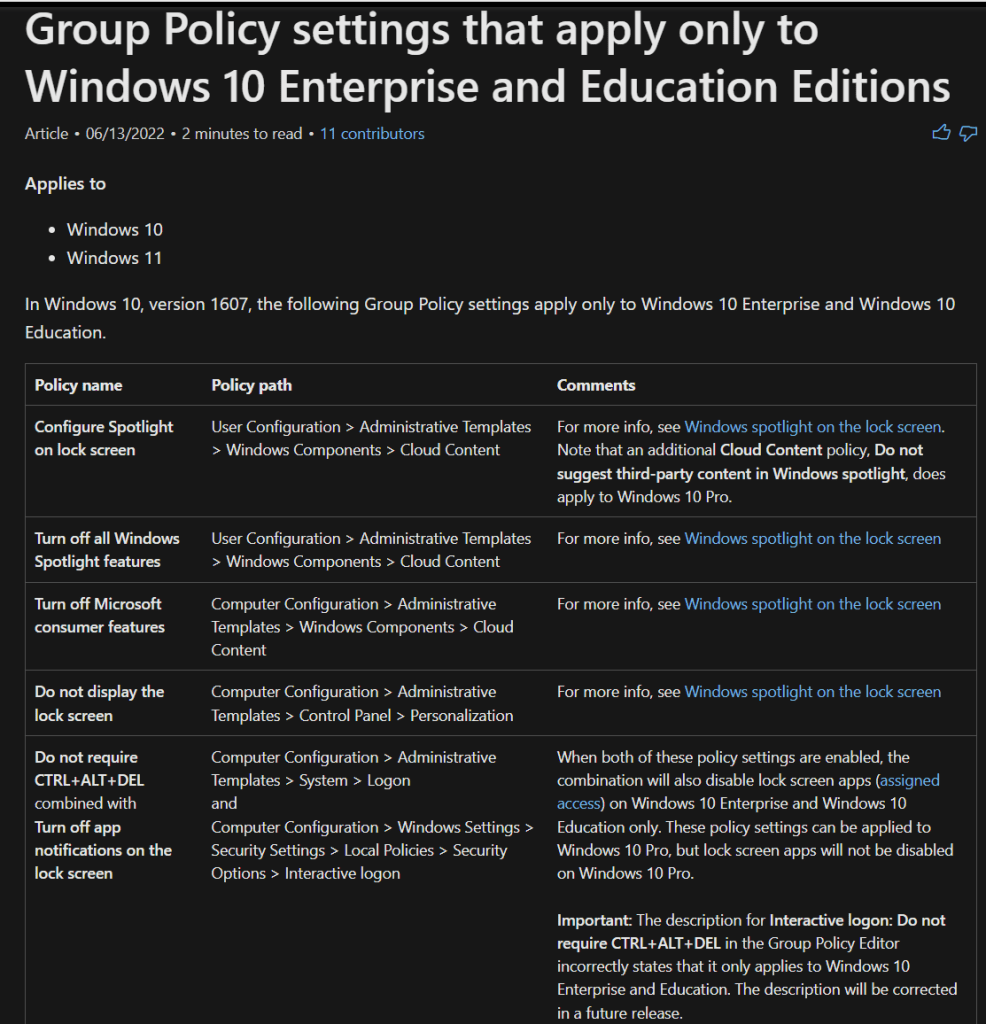
For years I have been deeply annoyed by the fact that Microsoft used to have a wonderful piece of documentation covering what polices could only be applied to an enterprise edition of Windows. You can still find that documentation via the Wayback machine, and I’ll go ahead and screenshot it right here and now while I still can below. However, sometime in 2022 or 2023 this document disappeared.
The fact that this document was taken down became a big problem when a multitude of issues began to affect Enterprise Activation. There were conditional access changes/issues tied to the retirement of the Business Store circa 2023, an update that broke it from spring to August of 2024, and lately, issues with Workplace Joined accounts (Entra Registered devices) breaking this too. Take a look at my new article on Everything I Know on Subscription Activation for the latest information on current issues with Enterprise Activation.
Each time it turned into a “Oh god this is broken (again)!…” Followed immediately by the ask of “Okay, what all did this actually break?” Without this documentation, all we knew was what used to be documented, with no clue if that was up to date. And, folks like a CSO really don’t care to look at the Wayback machine and/or be told this screenshot is what used to be documented and may not be accurate.
If you asked Microsoft, they would just tell you to go read the policy descriptions… which is great if you want to check one policy, but really not great if you’re trying to figure out if any of your existing policies are impacted. Manually looking each one up in Intune, or CTRL+F’ing 100 CSPs is not fun.
Well, I once again have a way to truly look up what all policies currently fall into this boat, all at once, and I’m here to share it.
Screen captures of the documentation from June of 2022, captured via the Wayback Machine (NO LONGER ACCURATE!)

So, What Are the Current Enterprise-Only Policies? And How Do You Find Them?
Fun fact: Did you know that the Microsoft CSP Documentation is automatically generated from a GitHub repo, and that repo is all stored in markdown format? They are, and because the policy is public, so is the GitHub repo: https://github.com/MicrosoftDocs/windows-itpro-docs
If you clone that repo, fire it up in Visual Studio Code (or any other multi-file search capable software), and search for this string in all files (CTRL+SHFT+F), emoji’s and all…
❌ Pro <br> ✅ Enterprise <br>…What you will get back is a list of all policies in all CSPs that do not work on the Pro OS, but do work on the Enterprise OS. I will put a copy of this as of today below. I have broken each CSP into it’s own section with a corresponding link to that CSPs documentation. If you see a policy name that catches your eye, simply click the documentation link, and CTRL+F that article for the setting name. That should take you right to the setting and its description.
Please keep in mind that Microsoft docs are ever evolving and that this list will change! The further out you are from date of writing (5/13/25), the less likely this is to still be accurate!!!
Assigned Access:
Documentation Link (CTRL+F me for the setting names below for more info).
Setting: ./Vendor/MSFT/AssignedAccess/ShellLauncherPersonal Data Encryption:
Documentation Link (CTRL+F me for the setting names below for more info).
Setting: ./User/Vendor/MSFT/PDE/EnablePersonalDataEncryption
Setting: ./User/Vendor/MSFT/PDE/ProtectFolders
Setting: ./User/Vendor/MSFT/PDE/ProtectFolders/ProtectDesktop
Setting: ./User/Vendor/MSFT/PDE/ProtectFolders/ProtectDocuments
Setting: ./User/Vendor/MSFT/PDE/ProtectFolders/ProtectPictures
Setting: ./User/Vendor/MSFT/PDE/Status
Setting: ./User/Vendor/MSFT/PDE/Status/FolderProtectionStatus
Setting: ./User/Vendor/MSFT/PDE/Status/FoldersProtected
Setting: ./User/Vendor/MSFT/PDE/Status/PersonalDataEncryptionStatus
Policy ADMX Windows Store:
Documentation Link (CTRL+F me for the setting names below for more info).
Setting: ./User/Vendor/MSFT/Policy/Config/ADMX_WindowsStore/RemoveWindowsStore_1
Setting: ./Device/Vendor/MSFT/Policy/Config/ADMX_WindowsStore/RemoveWindowsStore_2
Policy Application Management:
Documentation Link (CTRL+F me for the setting names below for more info).
Setting: ./Device/Vendor/MSFT/Policy/Config/ApplicationManagement/AllowedNonAdminPackageFamilyNameRules
Setting: ./Device/Vendor/MSFT/Policy/Config/ApplicationManagement/BlockNonAdminUserInstall
Setting: ./Device/Vendor/MSFT/Policy/Config/ApplicationManagement/ConfigureMSIXAuthenticationAuthorizedDomains
Setting: ./Device/Vendor/MSFT/Policy/Config/ApplicationManagement/DisableStoreOriginatedApps
Setting: ./Device/Vendor/MSFT/Policy/Config/ApplicationManagement/RequirePrivateStoreOnly
Setting: ./Device/Vendor/MSFT/Policy/Config/ApplicationManagement/ScheduleForceRestartForUpdateFailures
App Virtualization:
Documentation Link (CTRL+F me for the setting names below for more info).
Setting: ./Device/Vendor/MSFT/Policy/Config/AppVirtualization/AllowAppVClient
Setting: ./Device/Vendor/MSFT/Policy/Config/AppVirtualization/AllowDynamicVirtualization
Setting: ./Device/Vendor/MSFT/Policy/Config/AppVirtualization/AllowPackageCleanup
Setting: ./Device/Vendor/MSFT/Policy/Config/AppVirtualization/AllowPackageScripts
Setting: ./Device/Vendor/MSFT/Policy/Config/AppVirtualization/AllowPublishingRefreshUX
Setting: ./Device/Vendor/MSFT/Policy/Config/AppVirtualization/AllowReportingServer
Setting: ./Device/Vendor/MSFT/Policy/Config/AppVirtualization/AllowRoamingFileExclusions
Setting: ./Device/Vendor/MSFT/Policy/Config/AppVirtualization/AllowRoamingRegistryExclusions
Setting: ./Device/Vendor/MSFT/Policy/Config/AppVirtualization/AllowStreamingAutoload
Setting: ./Device/Vendor/MSFT/Policy/Config/AppVirtualization/ClientCoexistenceAllowMigrationmode
Setting: ./Device/Vendor/MSFT/Policy/Config/AppVirtualization/IntegrationAllowRootGlobal
Setting: ./Device/Vendor/MSFT/Policy/Config/AppVirtualization/IntegrationAllowRootUser
Setting: ./Device/Vendor/MSFT/Policy/Config/AppVirtualization/PublishingAllowServer1
Setting: ./Device/Vendor/MSFT/Policy/Config/AppVirtualization/PublishingAllowServer2
Setting: ./Device/Vendor/MSFT/Policy/Config/AppVirtualization/PublishingAllowServer3
Setting: ./Device/Vendor/MSFT/Policy/Config/AppVirtualization/PublishingAllowServer4
Setting: ./Device/Vendor/MSFT/Policy/Config/AppVirtualization/PublishingAllowServer5
Setting: ./Device/Vendor/MSFT/Policy/Config/AppVirtualization/StreamingAllowCertificateFilterForClient_SSL
Setting: ./Device/Vendor/MSFT/Policy/Config/AppVirtualization/StreamingAllowHighCostLaunch
Setting: ./Device/Vendor/MSFT/Policy/Config/AppVirtualization/StreamingAllowLocationProvider
Setting: ./Device/Vendor/MSFT/Policy/Config/AppVirtualization/StreamingAllowPackageInstallationRoot
Setting: ./Device/Vendor/MSFT/Policy/Config/AppVirtualization/StreamingAllowPackageSourceRoot
Setting: ./Device/Vendor/MSFT/Policy/Config/AppVirtualization/StreamingAllowReestablishmentInterval
Setting: ./Device/Vendor/MSFT/Policy/Config/AppVirtualization/StreamingAllowReestablishmentRetries
Setting: ./Device/Vendor/MSFT/Policy/Config/AppVirtualization/StreamingSharedContentStoreMode
Setting: ./Device/Vendor/MSFT/Policy/Config/AppVirtualization/StreamingSupportBranchCache
Setting: ./Device/Vendor/MSFT/Policy/Config/AppVirtualization/StreamingVerifyCertificateRevocationList
Setting: ./Device/Vendor/MSFT/Policy/Config/AppVirtualization/VirtualComponentsAllowList
Device Guard:
Documentation Link (CTRL+F me for the setting names below for more info).
Setting: ./Device/Vendor/MSFT/Policy/Config/DeviceGuard/LsaCfgFlags
Setting: ./Device/Vendor/MSFT/Policy/Config/DeviceGuard/MachineIdentityIsolation
Setting: ./Device/Vendor/MSFT/Policy/Config/DeviceGuard/RequirePlatformSecurityFeatures
Experience:
Documentation Link (CTRL+F me for the setting names below for more info).
Setting: ./User/Vendor/MSFT/Policy/Config/Experience/AllowScreenRecorder
Setting: ./User/Vendor/MSFT/Policy/Config/Experience/AllowSpotlightCollection
Setting: ./Device/Vendor/MSFT/Policy/Config/Experience/AllowWindowsConsumerFeatures
Setting: ./User/Vendor/MSFT/Policy/Config/Experience/AllowWindowsSpotlight
Setting: ./User/Vendor/MSFT/Policy/Config/Experience/AllowWindowsSpotlightOnActionCenter
Setting: ./User/Vendor/MSFT/Policy/Config/Experience/AllowWindowsSpotlightOnSettings
Setting: ./User/Vendor/MSFT/Policy/Config/Experience/AllowWindowsSpotlightWindowsWelcomeExperience
Setting: ./Device/Vendor/MSFT/Policy/Config/Experience/AllowWindowsTips
Setting: ./User/Vendor/MSFT/Policy/Config/Experience/ConfigureWindowsSpotlightOnLockScreen
Setting: ./Device/Vendor/MSFT/Policy/Config/Experience/DisableCloudOptimizedContent
Setting: ./Device/Vendor/MSFT/Policy/Config/Experience/DisableConsumerAccountStateContent
Setting: ./Device/Vendor/MSFT/Policy/Config/Experience/DisableTextTranslation
Setting: ./User/Vendor/MSFT/Policy/Config/Experience/EnableOrganizationalMessages
Setting: ./Device/Vendor/MSFT/Policy/Config/Experience/PreventUsersFromTurningOnBrowserSyncing
Setting: ./Device/Vendor/MSFT/Policy/Config/Experience/ShowLockOnUserTile
Search:
Documentation Link (CTRL+F me for the setting names below for more info).
Setting: ./Device/Vendor/MSFT/Policy/Config/Search/DoNotUseWebResultsService Control Manager:
Documentation Link (CTRL+F me for the setting names below for more info).
Setting: ./Device/Vendor/MSFT/Policy/Config/ServiceControlManager/SvchostProcessMitigationWindows AI:
Documentation Link (CTRL+F me for the setting names below for more info).
Setting: ./Device/Vendor/MSFT/Policy/Config/WindowsAI/DisableCocreator
Setting: ./Device/Vendor/MSFT/Policy/Config/WindowsAI/DisableGenerativeFill
Setting: ./Device/Vendor/MSFT/Policy/Config/WindowsAI/DisableImageCreator
Setting: ./User/Vendor/MSFT/Policy/Config/WindowsAI/SetDenyAppListForRecall
Setting: ./User/Vendor/MSFT/Policy/Config/WindowsAI/SetDenyUriListForRecall
Setting: ./User/Vendor/MSFT/Policy/Config/WindowsAI/SetMaximumStorageDurationForRecallSnapshots
Setting: ./User/Vendor/MSFT/Policy/Config/WindowsAI/SetMaximumStorageDurationForRecallSnapshots
But Wait, I Know There Are Others…
If you happened to notice a policy that you know was Enterprise only, perhaps one that was even documented in the old documentation captured at the start of this article, but I did not just list it, there are a couple possible reasons.
One possible reason is that the above CSPs represent the settings you will find in a Settings Catalog. So, if that particular Enterprise Only policy has yet to come to the Settings Catalog, it won’t be listed here yet. For that reason, it is again important to follow the steps provided to check the most up-to-date information on this list, as it is constantly changing as more and more is merged into the Settings Catalog.
The Exception:
That said, there is one CSP I have learned that throws a bit of a wrench into this search logic, and that’s the Personalization CSP. This CSP shows that it supports pro from top to bottom, including the infamous lock screen background (LockScreenImageUrl) and desktop background (DesktopImageUrl) policies, and thus does not show up in our fancy Visual Studio Code search. However, there is a big catch.

To rephrase, the personalization CSP only supports Pro on a Shared PC, or an Education SKU of Windows. So, if you are not using an Education SKU and not using the device in Shared PC mode, you do need to be an Enterprise SKU in order to apply these settings via Intune policy.
Applying it to Pro devices that are not Education SKU or a Shared PC results in error 65000 on the policy status. If you look at the key “Computer\HKEY_LOCAL_MACHINE\SOFTWARE\Microsoft\Windows\CurrentVersion\PersonalizationCSP” and value LockScreenImageStatus, pro devices get a value of 7. Values 1-6 are documented on the CSP here, with value 7 only showing up (as far as I can find, thank you to @springer on the WinAdmins Discord) on blogs like this, indicating that 7 means “Blocked, SKU not allowed”, further confirming this. Devices that are Enterprise do indeed get a successful value 1, along with other keys indicating the path to the local copy of the image, the URL used, etc.
There are other policy information pages, such as this one Configure the Desktop and Lock Screen Backgrounds in Windows, that do NOT include this important information/warning text. However, I believe the explanation as to why, at least for this page, is that this is more legacy information as it’s regarding deploying these via OMA URI. My guess would be that, with all things becoming centralized in the settings catalog, that this page won’t be around for much longer.
Disclaimer:
The following is the disclaimer that applies to all scripts, functions, one-liners, setup examples, documentation, etc. This disclaimer supersedes any disclaimer included in any script, function, one-liner, article, post, etc.
You running this script/function or following the setup example(s) means you will not blame the author(s) if this breaks your stuff. This script/function/setup-example is provided AS IS without warranty of any kind. Author(s) disclaim all implied warranties including, without limitation, any implied warranties of merchantability or of fitness for a particular purpose. The entire risk arising out of the use or performance of the sample scripts and documentation remains with you. In no event shall author(s) be held liable for any damages whatsoever (including, without limitation, damages for loss of business profits, business interruption, loss of business information, or other pecuniary loss) arising out of the use of or inability to use the script or documentation. Neither this script/function/example/documentation, nor any part of it other than those parts that are explicitly copied from others, may be republished without author(s) express written permission. Author(s) retain the right to alter this disclaimer at any time.
It is entirely up to you and/or your business to understand and evaluate the full direct and indirect consequences of using one of these examples or following this documentation.
The latest version of this disclaimer can be found at: https://azuretothemax.net/disclaimer/
 Azure to the Max