
This Article Has Been Retired!
Warning: I have chosen to “retire” this article. As time has marched on, and more information has been revealed, the blogs in this series have slowly become less and less up-to-date, and frankly, more and more of the information I was told as gospel has proved flawed or muddied. As such, I’m creating a new article to bring all of that hindsight together and document the saga this topic has become. To be clear, the tools for automated detection and removal are still up to date, but I am putting out new articles to cover them as well as the history and information surrounding this topic. Once available, I will link it below.
Take a look at my new article on Everything I Know on Subscription Activation.
Introduction:
This article in this series is purely to provide an update on the experience with Microsoft on this topic from roughly 9/30/2024 to 11/5/2024.
Simply put, it has not been positive. Trust me, I don’t like spending time writing up negative information about terrible experiences with Microsoft support, there is nothing at all enjoyable about it. However, I know that if I don’t, it will never get any better.
While I again do feel it necessary to share this information, I don’t want this mess to sully the good news of the new detection and automated remediation scrips, so I will be saving that for part 3 which should be coming very soon. As such, unless you are interested in hearing what information Microsoft has to share regarding this issue, of which there is not much and certainly little which is positive, feel free to skip this part of the series. You can find part three here.
- Recap
- What I Didn’t Say in Part One, My Ask of Microsoft
- What Has Happened Since September 30th?
- Conclusion
- Microsoft Update, November 11th 2024
- Microsoft Update, February 1st 2025
For those wanting part one, it can be found here.
Recap:
As mentioned in part one of this series, this issue was discovered on my end while working to correct a separate global subscription activation issue caused over the summer by Microsoft. Towards the conclusion of that initial case in early September, this issue was discovered. Microsoft quickly informed us this was some level of a “known issue” and they asked me to open a new case on this specific topic, that way they could keep us in the loop. That case was opened on September 17th.
Just two days later (September 19th), the initial version of part one of this series went live using the knowledge relayed by folks on the initial case and the investigation I had done in that time. Over the next couple of weeks, I wouldn’t hear much from Microsoft, but I continued to put a lot of my personal time into a script to automate this issue myself, something which will be coming back up in the next part of this series.
When I reached a rock and a hard place, I asked for a meeting with Microsoft to show these findings and discuss possible paths forward. That meeting was held September 30th, hence that’s the day I added several bits of new information to part one of the series.
Ultimately, to summarize that call, it became crystal clear that Microsoft themselves didn’t have much understanding or direction on this topic. They didn’t seem to know exactly when it started, exactly what caused it, or what workarounds may exist in the meantime outside of removing secondary accounts. There were beliefs this started sometime in the past 6-9 months, but community articles going back years suggested to me otherwise. There were claims that licensing all accounts fixed the issue and that this was because some change happened in those past 6-9 months where previously you only needed one connected account licensed, but there was no confirmation and similarly, the community articles going back to 2021 don’t seem to agree with that claim either. This is all despite the fact that I am far from the only person with this issue asking for a resolution, and not at all the person who has been asking the longest.
Frankly, I can’t claim to be surprised by this experience. However, I still came away from this meeting rather hopeful because I felt that my work was deeply appreciated and that my suggestions on how this could be fixed were valuable and actionable, finally giving those at Microsoft a direction to charge in.
What I Didn’t Say in Part One, My Ask of Microsoft:
And in order for the story to make sense, I need to explain now what it was that I left out of part one, that being what it is I asked Microsoft for.
In part one, I mentioned an automated removal method I had which, while it seemed to work and seemed to cause no issue, I did not like. It felt unclean and dangerous, and thus I stopped short of sharing it for fear of someone blowing up some machines, especially hybrid machines. I still don’t want to share exactly what this was, and would highly suggest against tracking it down and attempting it yourself, but for the sake of explanation, I need to say it was a function of DSREGCMD.
It has a command to remove all accounts from a machine, a command which also causes it to attempt to remove the primary account on an Entra joined device that connects it to said primary Entra domain. That is scary, I do not like that, and thus I did not share it. Importantly, this command is also undocumented as it is not listed on the DSREGCMD info page. While some may argue there are other locations of documentation, in my experience, Microsoft goes off their online articles as far as what is documented which then also determines what is supported. So again, I highly advise against figuring out what I’m talking about here, I just have to explain it a little for any of this to make sense.
As part of this removal though, if you were to run that command, you would see DSREGCMD.exe say something to the effect of “I am removing the account with Universal ID of X and UPN of Y.”
My ask of Microsoft, given my belief about why my automated fancy script was not working, was to update DSREGCMD with the ability to remove a single account via specifying something like a UPN or universal account ID. They seemed very interested in this possible answer during our meeting on September 30th, “this answer” being just modifying a tool to do something it seems to do already with a bit more of a specific input.
So, the hopeful wait began…
What Has Happened Since September 30th 2024?
…And boy has that hope rotted like a Halloween pumpkin.
October 2nd:
I went on to recap that September 30th call with Microsoft in writing, listing out all the action items that were produced. Things like, getting clarification on when this started, if licensing all accounts really was a possible resolve, if that was really the official resolve they were pushing, a clarification on Enterprise Only Policies since Microsoft had hidden that article some time ago making it very hard to say for certain what this impacted today, confirmation that unchecking the “allow my organization to manage my device” and then pressing “OK” on the popup (not “no, sign into this app only”) truly still allowed the machine to SSO to all apps without Entra registering it (another claim on the call), and of course, updating DSREGCMD.
October 11th:
In early October, the more frontline engineers also on this ticket got the bright idea to to ask me to get on a call so they could “Have an engineer from the Intune team help me in deleting devices from Intune.” – clearly showing they still had no idea what this case was about, despite all the details, emails, and prior conversations on the ticket. Not confidence-inspiring. I kindly told them to talk with each other and get on the same page.
October 17th:
In the middle of October, after several weeks of silence, I followed up on my email from the 2nd asking for a weekly status update on this ticket since we were struggling to get communication or updates on any of our questions from the 30th. That check-in request would be acknowledged, but it would be over a week before we heard anything with content.
October 29th:
It wasn’t until after hours on the 29th of October, basically one month later, that I would finally get a true status update. Even ignoring the fact it took a month, this was not a good communication. Long story short, they still don’t know anything. They still don’t know when it started, what the expected behavior is under various circumstances, if licensing all accounts that have been joined truly works or not, etc. They made no comments on my ask to update DSREGCMD. They were unable to provide any documentation on the current enterprise-only policies, instead suggesting to look at the policies themselves for guidance, to which I pointed out how few of the once documented and still impacted policies show this information in said per-policy documentation.
Most disheartening, I was provided with “the latest updates” on the issue in the form of three links to public articles, most of which were last edited on October 1st, or in early July at the time received…
Windows 11, version 24H2 security baseline – Microsoft Community Hub
Download Microsoft Security Compliance Toolkit 1.0 from Official Microsoft Download Center
Security baselines guide | Microsoft Learn
Simply put, either I am a blind fool, or these articles have no bearing on this topic. I challenged them to explain how any of these articles or tools had anything to do with this case, a comment I’ve still heard no reply on just shy of a week later. I think at this point it’s safe to conclude there is no value here with regards to this case.
Conclusion:
At the end of the day, I know this is not a failure of the front-line people just trying to provide support at Microsoft. Nor is it a failure of the less frontline folks on this case. It is, without a doubt, a failure of Microsoft support as an organization. I know this because I’ve experienced similar things far too many times at this point for it to be the fault of any one team or manager. I mean, for peat’s sake, the savior of the last case (the broken April update) was the person who is now struggling to make progress on this issue, so I have a hard time believing this is their fault.
I also know this because I’ve had the recent pleasure of working with some other teams under different leadership who handle support in a different way and who have restored my faith and sanity that good support is indeed not that hard when done correctly.
So, should any rep involved in this stumble across this post, don’t take this personally but do take it seriously.
Microsoft Update, November 8th 2024:
On November 8th, a little over a week and a half later, Microsoft replied to the multitude of concerns and issues we took with their update on October 29th. There was some movement in this response which I wanted to share.
- Most importantly, Microsoft stated that… “(From PG) If both accounts would like to leverage enterprise level features, they would both require to have E3/E5 license, This is rule and change was to allow multiple tenant accounts even though previously only one tenant account was allowed, now multi-tenant accounts can be managed and this is when rule was updated that both tenants do need to have license to use enterprise features or keep the reg key in-place to not allow adding another tenant work or school account.”
Marathon aside, this seems to confirm Microsoft has taken the stance that the situation is as follows… Previously, joining a second account to a Windows machine simply broke Subscription activation outright. That explains the articles that date back several years detailing this issue with the resolution of simply removing all secondary accounts. They “fixed” this problem by making it possible to join multiple accounts and perform subscription activation IF all the accounts have the appropriate license to do so. Whether or not someone has truly tried this and confirmed that it works is still unknown. - Additionally, we received confirmation they are working to make it possible for me to submit a feature request regarding DSREGCMD. While the rapidly progressing community solution may provide an interim solution to this issue, having a Microsoft-supported answer is a must. I will provide another update to this article when I am actually able to complete that form.
- Lastly, regarding the aforementioned Security Baseline articles, the reason these were provided was clarified.
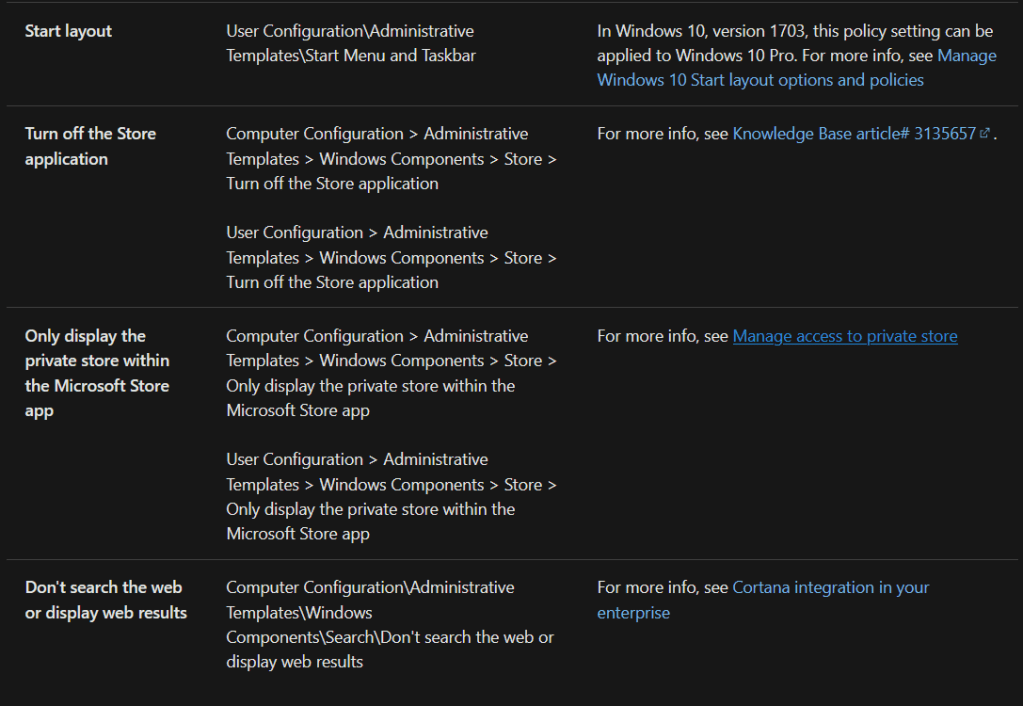
To briefly recap, as mentioned a few times in this series, Microsoft used to have an article detailing what policies require an Enterprise edition of the Windows OS in order to take effect. This list used to be publicly documented and can still be seen through internet archiving tools. It was taken down around June of 2023, I believe around the same time the private business store was retired. I’ll include some screenshots below just in case this should ever go down.
When something breaks, as is the case here with Subscription Activation, the most important thing to understand is what effect that will have. In my opinion, the biggest loss when it comes to Subscription Activation is Enterprise-edition-only policies such as the ones previously documented. For example, not being able to apply or update corporate wallpapers is very visible*. All in all, that Microsoft article served the important purpose of answering the “what will break” question for this scenario, hence we wanted to know what the current version of that list was and/or where it can be found nowadays.
Well, Microsoft provided those security baseline policy articles as a response to that ask… While articles regarding “Policies that are best practice for an Enterprise” and “Policies that can only be applied to an Enterprise edition of Windows” both contain the words “Enterprise” and “Policies”, they are not at all related. I would surely hope so too as otherwise, it would be very difficult to secure the Windows OS for anyone without the Enterprise activation level. While still not really positive, I do at least appreciate knowing it was a well intentioned lack of understanding that led to these articles being shared as opposed to simply trying to pull a fast one on us.
*And yes, I know there are other ways to do this, but using this policy and having the required activation for it is the right way.
Below are screenshots of the now-hidden Microsoft article which used to track all policies which could only be applied to an Enterprise level OS. This can still be seen here.

Microsoft Update, February 1st 2025:
I wanted to provide a quick update on this topic since it’s been quite some time since I last added to this article.
Long story short, the tune that I’ve been getting on the Microsoft side since the new year is…
- Regarding my ask in the section “What I Didn’t Say in Part One, My Ask of Microsoft“, there response is “There is no such team to help with this within Microsoft”
- Regarding this topic as a whole (automated removal of secondary accounts), the current line is “There is no way to achieve this.”
As far as the second comment, I really don’t know what to do other than point right back at the original case description.

Simply put, the claim that there is no automated way to do this isn’t news and the fact there isn’t a solution, and that multiple large organizations are asking for one, is the whole reason the case was opened, something ironically done at the direction of Microsoft. The support staff is aware of this community project and that it’s working but has no leg to stand on as far as claiming it is the solution given the community / unsupported aspect of it, which is exactly why I continue to push for a supported methodology.
And that brings us to the first point, with the claim being there is nobody to present our feature request to regarding DSREGCMD. Simply put, this is an actively documented and supported tool, so I simply don’t believe that. There is someone, and that someone can certainly sit down on a 30-minute call. That person can then say “no” and leave the call, and I’m fine with that, but I’m not going to believe that there is simply no resource in existence. I won’t say what, but I will say there are other claims I could believe as they would be more grounded in understanding and research than what I am getting currently.
This has unfortunately resulted in a period where it simply feels as if nothing is happening, and that support has given up. I wound up being the one to direct them to the contributors of the article and am hoping some positivity comes out of that. If anyone out there is holding out for a 1st party solution, I would not hold your breath, and I would go read the new update on part three of the article.
As far as the larger picture with questions like “Does Microsoft plan to fix Enterprise Activation when multiple accounts are present?”, I haven’t heard any movement or interest in this in months and given the overall situation with the case, I don’t expect to ever get this answer.
Disclaimer:
The following is the disclaimer that applies to all scripts, functions, one-liners, setup examples, documentation, etc. This disclaimer supersedes any disclaimer included in any script, function, one-liner, article, post, etc.
You running this script/function or following the setup example(s) means you will not blame the author(s) if this breaks your stuff. This script/function/setup-example is provided AS IS without warranty of any kind. Author(s) disclaim all implied warranties including, without limitation, any implied warranties of merchantability or of fitness for a particular purpose. The entire risk arising out of the use or performance of the sample scripts and documentation remains with you. In no event shall author(s) be held liable for any damages whatsoever (including, without limitation, damages for loss of business profits, business interruption, loss of business information, or other pecuniary loss) arising out of the use of or inability to use the script or documentation. Neither this script/function/example/documentation, nor any part of it other than those parts that are explicitly copied from others, may be republished without author(s) express written permission. Author(s) retain the right to alter this disclaimer at any time.
It is entirely up to you and/or your business to understand and evaluate the full direct and indirect consequences of using one of these examples or following this documentation.
The latest version of this disclaimer can be found at: https://azuretothemax.net/disclaimer/
 Azure to the Max