
This Has Been Fixed as of August 2024:
A preview fix came out in July as part of KB5040527 and KB5040525.

That fix was then fully released as part of the August update KB5041585, although they didn’t copy over the above noted fix in the documentation from the preview update.
I’ll leave the article up to detail the saga of this topic, as well as cover a few potential issues you may still run into regarding CA (See section “If you are still having issue’s after applying the August patch”).
For those having issues with workplace accounts, I suggest my other series: Detecting & Automatically Removing Secondary “Work Or School” Accounts: Part 1 – Azure to the Max
Clarification:
This article is probably going to confuse a few people. Yes, this topic was previously being covered by an article dating back to May that covered both this issue and the WinRE update issue. The point of that article was to both discuss the recent update experience and the recent support experience. Unfortunately, the Activation Issue is still to this day (as of date of publication 2024/08/22, it is now fixed) not officially fixed and has become a complete mess. As such, continuing to update the original article was making it extremely messy and confusing as to which issue was being discussed. As such, I am making new articles (like this one) to split the topics out.
Please know that there may be some confusing language as again, much of the start of this was ripped from the original article.
KB5036893 & KB5036892 (April 9th, 2024) – Windows 11/10 devices no longer upgrading to Enterprise Subscription
This section was written in early May, 2024. Scroll down to the “Updates” header for more recent information.
The week of May 6th we noticed a recently reset Win11 device wasn’t upgrading to Enterprise. Thanks to bug #37040672 which crippled this process from the summer of 2021 clear into the summer of 2022 (this was due to back-end changes in combination with KMS keys, not OS updates), I have an extensive history with troubleshooting this process. What we found was that the task responsible for this operation (Task Scheduler, Microsoft, Windows, Subscription, LicenseAcquisition task) was coming back as “Access is denied.”
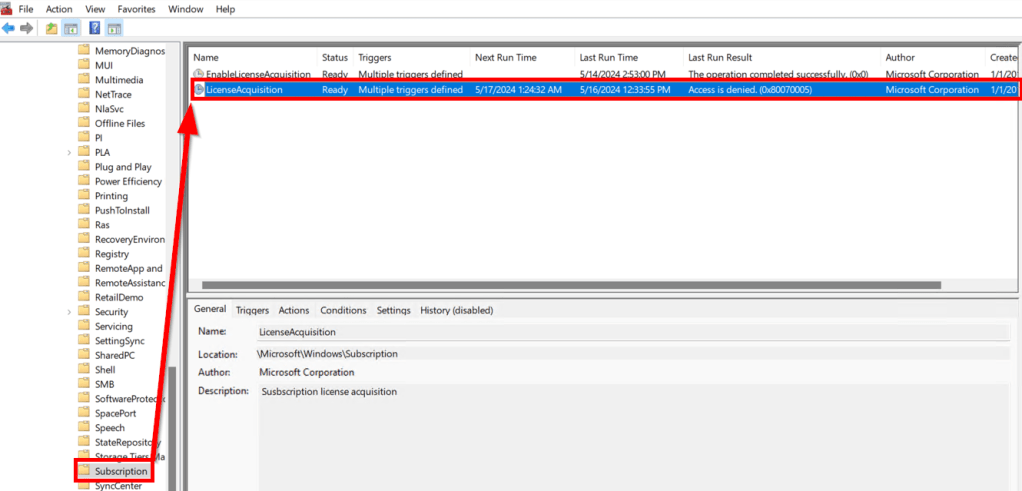
At first, I hoped this was some sort of fluke, but the next week there was another device, then another, and then we started replicating it on more internal devices. Looking back on all my notes from that prior bug, I tried all the previous cleanup commands such as…
net stop clipsvc
rundll32 clipc.dll,ClipCleanUpState
net start clipsvc
…to no avail. I also validated through slmgr /dlv that the various devices were either activated under the generic Pro key ending in 3V66T or OEM_DM channel using their BIOS pro key (Both of which are M$ confirmed legitimate options to get this to work on said prior bug). Nothing was seemingly wrong anywhere, but the devices refused to upgrade. At this point, we opened a ticket and continued to investigate on our end in the meantime.
As our internal investigation continued, as it so often does, Windows patch quickly came into question. Could a recent update be causing this? I was extremely skeptical of this as things have been so smooth update-wise for years… But, sure enough, we set up a device that had been set aside in a wiped state for some time and was still running the December 23H2 build, and sure enough it upgraded just fine. We then patched it to the May build, wiped it, set it back up, and sure enough it won’t upgrade now.
While our initial back and forth on the ticket wasn’t fruitful, once we provided the above information support quickly confirmed that…
“We understand the situation here because there is a known issue going on with the April patch. If you install the April patch, then users will automatically log out and will face similar behavior as you are facing… Our PG team is still working on it to share a fix however there is no such fix available even in the May patch as well. The only workaround you may try on the machine is to temporarily add the user to the local administrator group…”
While I can confirm making myself a local admin did allow the task to “complete successfully” and my machine to bump up to Enterprise (further confirming this is the problem), obviously, turning an entire enterprise into administrators of their machine is an incredibly unrealistic workaround. In fairness to them, I don’t think they were trying to hand it over as an end-all-be-all answer like in the above section. Still, it would seem this is another faulty patch with heavy enterprise impact and yet here we are a month+ down the road from release with no ETA, no workaround, and an overall feeling that this isn’t getting very much attention.
I asked for further information on any online documentation of this problem or any bug # and they confirmed neither of these yet exist (at least not anything shareable). Additionally, they further confirmed there is no ETA for a workaround or permanent fix at this time. Furthermore, they confirmed this is also impacting Windows 10. There was the possible suggestion of an out-of-band patch in late May but, with no ETA we find that hard to believe.
Does this impact existing devices?
(From the future, yes it does, we kept monitoring the below query and found that they fell out of activation after roughly 90 days)
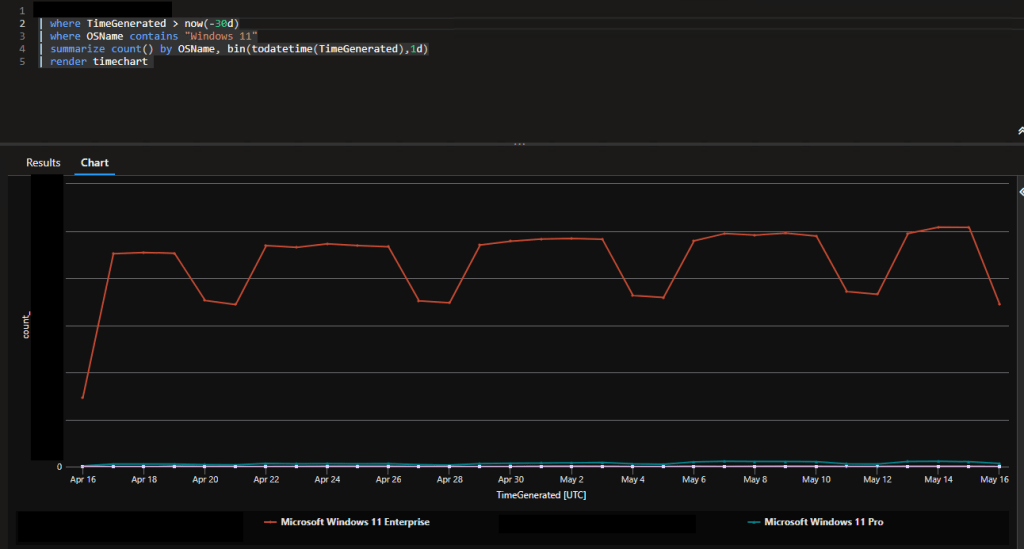
This is unfortunately not yet clear. The way the support communication reads suggests that it absolutely does, and that is something we have asked for in depth clarification on and are awaiting a response to. From what we can see now, we have not seen anything besides net-new devices get affected (devices running the April patch or newer when they get autopilot provisioned). Taking a look in Log Analytics (check out the Log Analytics Index if you too want this kind of data at your fingertips), I don’t see a significant drop in the Windows 11 devices reporting in as Enterprise, nor a significant growth in Pro. That said, I really want to end that sentence with a “yet” because, if I recall correctly from last time I dealt with problems around this component, I believe that subscription can hang on for several weeks before it tries to renew again. Meaning that, given the delay in patches going out and the delay in that hang-over time, it may just be a matter of time before this goes very south. Then again, that would be a pretty high number of weeks that it would need to be able to hang on while stale at this point… we shall see.
What does this impact?
In short, the biggest concern to me is that this impacts your ability to apply policies to machines which are restricted to only Enterprise-licensed devices. At one point in time, Microsoft had a list of those policies, I managed to find an old screenshot of some of them here…
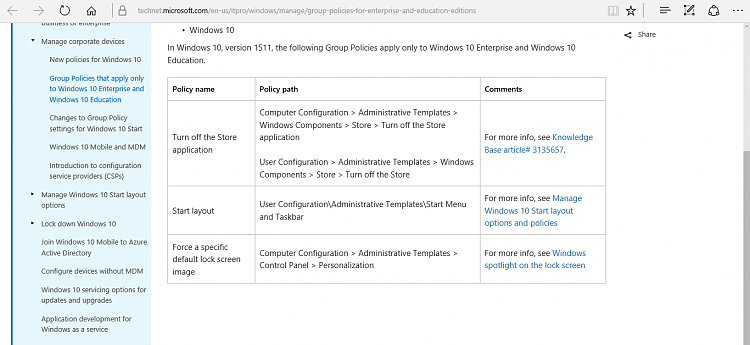
…Yet for some reason, this article no longer exists, nor can I find a replacement for it. This is something else we have asked for. In any case, I know from the last round of problems with Enterprise activation that this affects your ability to deploy managed lock screens and backgrounds*, disable Windows Spotlight, and disable the Microsoft store, most of which are documented above and I can confirm we are experiencing. There are several other policies affected by this which aren’t captured in the above, but those are the only ones I know off the top of my head. In any case, because of this, we are getting a default rotating random lock screen image, a black wallpaper, and I am able to utilize the Microsoft Store to install apps like Creative Cloud. Note that many store apps can be installed without admin access so you could probably install TikTok or Netflix if you really wanted to. Additionally, Windows Spotlight (I believe is the name) is enabled, this is what shows those fun fact bubbles you can click on in the lock screen.
Again, this isn’t just our organization, it’s anyone who is using an Enterprise Subscription to bump their Windows machines from Pro to Enterprise (typically done via a Windows 10/11 E3 or E5 license). I have already confirmed several others seeing this in the WinAdmins community.
*Yes, technically you can push a wallpaper to a device and store the image locally and then point a registry key to that image to set the wallpaper and lock screen. However, I’m not confident that’s actually compliant (I certainly don’t endorse it), and it’s a lot more difficult to manage than something like an Azure Blob Storage which makes it so incredibly easy to swap in new images as opposed to pushing an app out to devices to swap the image out. I am also not confident the registry key is really enforced/locked down. At the end of the day, we are paying for Enterprise features, so we better be able to use them.
I noticed the above also mentions the inability to push a managed Start Menu however, our managed menu which comes via standard Intune policy is not having any issues.
Scarily, it’s also very worth noting that Microsoft released a patch February 29th which impacted the process for Enterprise activation. Allegedly this causes some new toast notifications, but we haven’t seen anything new at all nor has support mentioned it (although, we did mention this to them). That said, we had new OEM stock come in during April that had this issue, and there’s no way the devices were that up-to-date out of the box for this issue to have happened. Unless someone was manually patching them prior to Autopilot (very white glove and unlikely), we don’t know how this error could have happened and yet be tied to something as recent (at the time of) as the April patch.
Updates:
As information is released regarding these issues, I will add it here.
Again, some of these updates pre-date the creation of this standalone article and thus may have some confusing references to the other bug previously on the combined article.
5/17/24 – A Community Solution!
During discussion in community forums with others having the issue, I was linked the below which is well ahead of me in terms of noticing the issue and even finding a solution, check it out! I’ll be moving to deploy the PowerShell solution myself and will report back here with how it goes.
https://call4cloud.nl/2024/05/kb5036980-breaks-upgrade-windows11-enterprise/
I’ll also still plan to update for information passed along by Microsoft in terms of them pushing out a fix.
Edit: This fix does work if you want to tackle solving the issue yourself. Can deploy it as a script or remediation, take your pick!
6/6/24:
Sadly, there is still no ETA regarding a direct fix from Microsoft the enterprise activation issues. Curiously, they seem entirely unaware of the fix discovered for the issue which is documented above. Either unaware, or for some reason not sharing.
7/1/24:
Unfortunately, the Enterprise Activation issue caused by KB5036893 & KB5036892 is still a complete mess, although I can’t claim to be an atypical representation of the Microsoft support experience.
To recap, the standard patch-Tuesday patch for April broke device’s ability to properly perform an Enterprise Subscription Activation through something like a Windows 10/11 Enterprise license. This effects all organizations using this feature, and this breaking prevents the use of policies and features which are restricted to Enterprise devices. Microsoft confirmed this issue was caused by the planned standard patch in April. Even to this day, Microsoft has been unable to offer a workaround for this issue and has stated one does not exist.*
When I opened the ticket in early May, they quickly confirmed being aware of the issue and told me they had hoped it would be resolved by the May standard patch window which had just passed, at least by the time my ticket made it to this team. I was thus told the new hope was that it would be resolved with an out-of-band update in late May… When May came and went, I was told they were “hoping” for the regular patch Tuesday June window to cover it… That too came and went, and the new hope as of mid-June was an out-of-band update in June… despite no ETA, confirmation, testing, KB, deployment date – nothing.
At this point I had to do the ugly and unfortunate thing of calling this out. It’s ridiculous that an issue this impactful, at this scale, has been going for months, especially with no workaround.* It’s unprofessional to keep having support tell us how they “hope” some update will come out when in reality they have no actual confirmation to share and thus it feels like a complete joke. “Fool me once, etc.” We asked that our account reps get involved to make sure this ticket was headed in the right direction and that the next thing we received would be true confirmation of what was truly going to happen and when.
After over a week of silence we followed up only to be told that “As per the latest update, the fix for the issue is expected to be released in a security update in the last week of June or the second week of July.”
Obviously, this was not a good response given what we had just called out. Obviously, given they still didn’t have a clue if it would come as an out-of-band update (last week of June) or regular patch Tuesday update (second week of July), it gave us the impression that there is still no actual confirmation of anything. Given this exchange happened during the last week of June, it was fairly obvious there was no real chance of this as any deployment would have been well defined and established by then. We called this out and asked for confirmation that a fix actually existed and was ready to deploy, then asked for confirmation as to when this would be deployed.
One week later, there is still a deafening silence. As such, I would not hold your breath expecting this to be fixed anytime soon. The June window has come and passed, and if it was to be deployed on the upcoming patch Tuesday, there would almost certainly be confirmation by now.
*If you see my update from 5/17, you will see that there is a workaround… Microsoft just doesn’t seem aware or willing to share. I was asked not to show this to them in an effort to speed up a full resolution update going out the door, as you would think not having a workaround would cause this, but this doesn’t really seem to have worked.
7/12/24:
Unfortunately, regarding the Enterprise Activation issue caused by KB5036893 & KB5036892, I still don’t have good news. I was told in a much less confident/detailed manner that the issue would be resolved by quote “A security patch getting released tomorrow” (which would have been patch Tuesday). However, even after installing the latest KB5040442 bringing me up to 22631.3880 on an affected device, I am still not seeing the upgrade perform successfully and the task is still showing as access denied, even several reboots later.
I’ve since asked for confirmation as to what KB was supposed to resolve this, information which has been readily available and provided on literally every other Microsoft case I have been involved in where an update was needed to fix a problem (just like the above). Maybe it was some other patch which for some reason my device isn’t seeing and applying, but I’m going to guess that the real answer is that this once again wasn’t actually fixed. Time shall tell. – See below.
Later that day: I wrote most of the above late on the 11th and simply didn’t have time to revise it until today (the 12th). Well, very late on the 12th I finally received an answer to my ask of what KB(s) the fix was coming through. To little surprise, it had no KB numbers for me and instead boiled down to “We are sorry this is taking so long, we have escalated it (again?), it got delayed in testing with the product team, we will keep you updated.” – Which means it never was ready to push… It also suggests the answer to my asking them if a fix even really existed yet over these past weeks was “no”… which means that all the “hopes”, “confirmations”, and “wills” I have received over the past three months have been entirely baseless claims. Fun!
7/18/24:
If you have read any of the above, you know that around 7/1 we had a reality check moment regarding how the case was going. That never got any response at all. The exact same behavior continued, and we were lied to again (See 7/12 update) about when this update would come out. I know that “lie” is a strong word however, we were also informed 7/12 that this update hasn’t even passed testing yet meaning every claim that it was going to push was obviously not true as it wasn’t even possible due to it not even being ready. Either these are lies, or the person relaying these claims has little interest in proof checking the information their getting, even after it’s put egg on their face half a dozen times. So, we sent another reality check email, and again it just got ignored as best I can tell. It was not addressed and nothing about who is responding or how has changed.
As part of that, we have received yet another claim that the update will push on July 23rd described as “the upcoming Tuesday out-of-band patch.” We have been asked to check for updates and then check the behavior on July 23rd.
I have responded to this email again asking for the KB of the update so we can be sure we install the right thing. More so, I have never had a Microsoft ticket which required a KB based update to fix where the KB number for the update wasn’t confirmed weeks in advance, let alone now down to days. For that reason, and that this would only be the 8th or 9th time I’ve now heard this, I’m still incredibly suspicious of this claim. If it turns out to be false again, I will likely give up and have them close the ticket. I’ve got better things to do than fight the people who are supposed to be supporting us.
7/25/24: – A preview of future resolution.
(This section has been updated to add more detail and clarification)
Regarding my last entry…
I sadly don’t have a ton of time to detail this all out, but on the 23rd we had a follow up call with our Microsoft representatives where, to make short work of it, nothing could really be added to the conversation. It was true, the promise of rollout had once again fallen flat and nobody had any answers as to what was going on or why we kept getting told over and over what seemed to be false information. We expressed the same frustration as we had already in the last call two weeks prior, we highlighted the emails in Mid-June and early-July expressing that same frustration (which I got confirmation were received, although never responded to), but ultimately nothing could be said except asking for more time. On one hand, these issues take time. On the other hand, these complaints dated back over a month.
Moving on… To Preview of the resolution!
Again, I’m working on a tight time budget but a preview update did release today for Win11…
July 25, 2024—KB5040527 (OS Builds 22621.3958 and 22631.3958) Preview – Microsoft Support
And apparently a preview update for this issue had released Tuesday for Windows 10, which we have none of in our environment…
July 23, 2024—KB5040525 (OS Build 19045.4717) Preview – Microsoft Support
(Under the Windows 11 Enterprise section of the above)

I was able to install the update although, I personally had to download it from the catalog link near the bottom of the page as not even my unmanaged devices could see it through Windows Update, Optional Updates, or Get-WindowsUpdate (PowerShell). I was then able to provision those units and successfully activate to enterprise!
That said, this is a preview update which means it’s not ready for prime time and Microsoft does not recommend deploying this is large quantities. I did have a unit BSOD in the middle of AutoPilot while testing this update which is something I have never seen before.
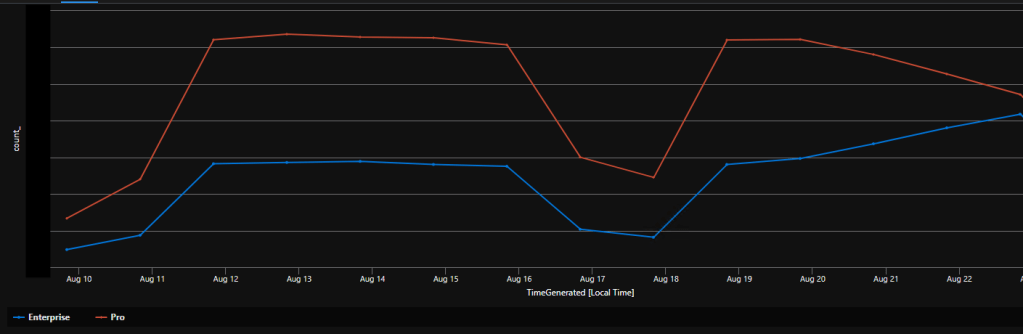
Lastly, what remains to be seen is what will happen to existing devices. I sadly don’t have an existing device that had fallen out of activation to test with. But, through the power of Log Analytics, we watched roughly 2/3rds of our existing physical audience fall out of their enterprise activation by about mid-June. Hopefully what we will see as this update rolls out in an official capacity is these units returning back to Enterprise.
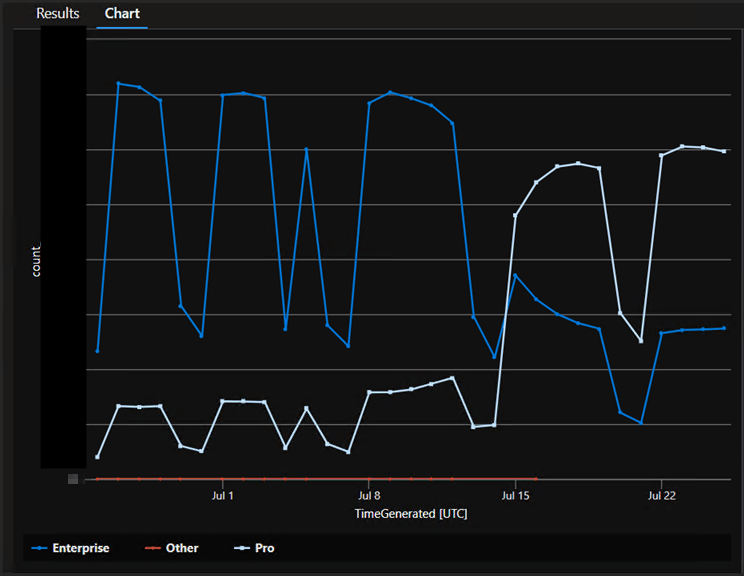
For anyone with my Log Analytics Device Inventory set up and wanting to know how to make that chart, here is the query I used. Note that I excluded our Windows 365 (“CPC-“) devices because they are not affected by this issue.

8/15/24: The wait continues.
I’ve added some clarifications to my last update above from some news learned since.
What to expect going forward:
First, the bad news. After continuing struggles on the ticket, we were put in contact with a SME who quickly confirmed what essentially amounted to a lot of bad news. We were correct, the preview update is not recommended for large scale deployment. We were correct, the elements in the preview update will eventually find their way into true production updates. And, we were correct, there is not a guarantee that will be the next patch Tuesday or the one that follows. While we were happy to finally be in contact with someone who could provide information, they effectively just answered the same questions that had been on our emails for several rounds (unanswered), and there wasn’t much to say beyond that. We did get a peek behind the curtain of how Microsoft support works though, and maybe I’ll be tempted into writing a post about that.
At the time of the above meeting, the next patch Tuesday would have been August 13th. Sadly, I can confirm this fix was not included in the now released KB5041585 on that day. (This is not true! It WAS in the update. It just wasn’t documented, and support even said it wasn’t as seen below.) You will notice that the known issue clearly documented in the previous preview KB (see white screenshot in prior update) is not listed under this update cumulative. We have asked multiple times for any information on when that update is expected to be released, along with various information on our testing updates, and have received no responses at all from Microsoft since the prior meeting now several weeks ago.
The next best hope will now be September 10th.
More testing results:
In good news though, we were able to locate a unit provisioned prior to the April update, and thus almost certainly was enterprise at one time, and had since fallen out of activation. After installing the preview update, and rebooting, the device was able to upgrade once again with the scheduled task executing as expected.
This bodes well for whenever the update does finally release.
8/20/24: The insanity continues.
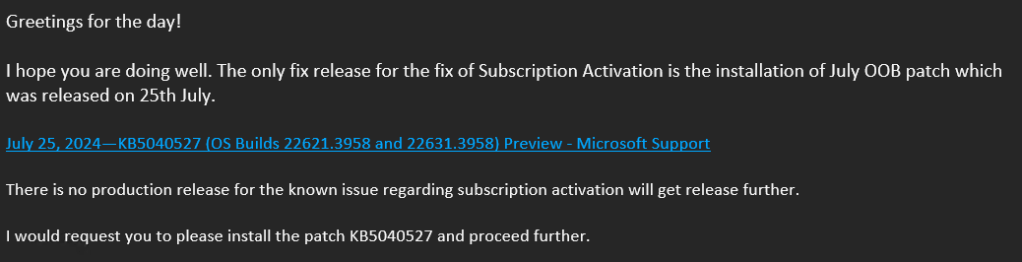
As mentioned above, we’ve been asking Microsoft for information as to when this preview fix will get rolled into a cumulative production monthly update. Well, this is the response we just got.

If true, this is insane. Preview updates, as confirmed by the SME we worked with several weeks ago, are NOT meant for mass deployment to production devices. It also requires special configuration to even make possible.
If false, which is incredibly likely given this is the same engineer who gave us non-factual information more than a dozen times on this case and again, it directly conflicts with information given to us by the SME, then we are basically out of patience for this. What is the point in opening a support ticket if all the information we get takes weeks and is ass-backwards even when it does arrive. We may as well just shut up and wait.
We do know that what they are saying about the August cumulative update not containing the fix is true though as we saw positive results with existing devices upgrading to Enterprise again with the preview patch, but now many devices have applied the August cumulative patch, yet nothing has changed regarding the activation numbers. This makes sense as again, the fix was clearly documented on the preview patch but not the August monthly rollout.
At this point my organization has moved to involve senior resources on both sides of the aisle to try and figure out what on earth is going on here.
8/23/24: It is fixed apparently.
In a whirlwind turn of events, and in huge thanks to Rudy Ooms who I had a long back and forth exchange of information with, I can confirm that this issue was fixed in the August cumulative update KB5041585.
That means, that despite it being very well documented as a fix included in the July OOB patch KB5040527 (see below), this same documentation was, for some reason, not copied over to the August update.

Additionally, it means somewhere between zero, terrible, or possibly just factually incorrect communication of this was done internally at Microsoft leading to the below claim on the 20th that this fix was not included in the August update and would never be rolled into any cumulative update. Keep in mind this was one week after the patch released, and weeks into us asking when this fix would be rolled into a cumulative update. Making this even worse, our internal senior side reached out to our Microsoft senior representation as a result of this claim, only to endure 3 days of silence outside of a “We will look into this”, further showing there seems to be very little internal understanding of what is happening / has happened, even a week and a half after the fact.
In more positive news, I can confirm that as the update is applying, we are seeing a reversal of what we saw in June with devices flipping back from Pro to Enterprise. (The dip is from the weekends and devices being offline.) We hope to see this trend fully reverse as the final waves / cycles complete.
If you are still having issue’s after applying the August patch KB5041585:
This is likely due to conditional access in one of two ways* (See next header, I forgot something). Although, you would have been having this issue prior to April (when the update released that entirely broke this) if so. Back on track, this again could be one of two things.
- You have a “Block All Cloud Apps” policy
- You have a “Require MFA for all Cloud Apps” policy
The easy solution is the same either way, you need to exclude a cloud app or possibly two. From my end, where I have devices I can actively test with and confirm it functions, you only need to exclude the Windows Store for Business, AppID 45a330b1-b1ec-4cc1-9161-9f03992aa49f. Depending on your exact setup though, there are combinations of setup where you will also need to exclude the Universal Store Service APIs and Web Application, AppID 45a330b1-b1ec-4cc1-9161-9f03992aa49f.
If you have issue #2, meaning it’s MFA that’s in your way rather than an outright block (MFA being something an automated scheduled task can’t fulfill), there is another option. Folks in the know may recall waaaaay back in February, and waaay back at the start of this article, I briefly mentioned a prior change to this process when Microsoft released KB5034848 on February 29th. What that did was enable this process to work with MFA in the form of a toast notification users would have to interact with and manually complete to allow the MFA requirement to succeed. Your options are to either educate your users and ensure they are completing it at least once every 90 days or so (that’s the drop off period for this activation), or… just do the above and again exclude the cloud app so it can happen on its own.
Rudy has a great article on this topic, granted it pre-dates the February changes: Subscription activation Issues and the Windows Store API (call4cloud.nl)
or you can get your info right from Microsoft(copied below), including the February information.

If you are still having issue’s part 2:
Back on 8/15/24 I mentioned some additional testing on an existing device that was successful. The thing I didn’t mention about that testing was the issue I ran into. To make a long story short, if you add a second work or school account to your device, it will break this activation.
How do you accidentally add two accounts? It’s as simple as signing into any local application with that second account, say you have an Outlook account or Teams account in a test tenant or something like that and you want to see it too, and then you get this popup.
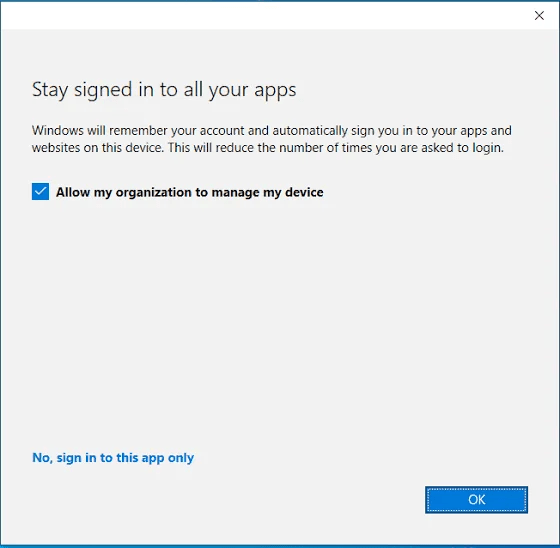
By default that box is checked and if you hit OK, the work or school account is added to your device and your device becomes Entra Registered in that other tenant. Yikes! (So to be clear, what you want to do is hit “No, sign in to this app only”)
How do you fix this? Well, there’s no short complete version of that. The shortest version is that you can deploy a key to the devices you manage which will prevent this from happening going forward, and rather than re-write the wheel, go check out this MSEndpointMGR article: Are you tired of “Allow my organization to manage my device”? – MSEndpointMgr
The problem though is what do you do about existing devices that already have a second account added, and what do you do to prevent devices you don’t manage and thus can’t push the key to. That’s going to be its own article and the next mess I get to write long updates about.
9/9/24: Final thoughts and conclusion
In my last update I mentioned that some of our senior resources reached out to Microsoft. That did eventually produce a meeting a couple Monday’s ago with higher level resources. That meeting was far superior in terms of content (and most everything else) to any other support interaction that occurred during the course of the case.
What I learned during this discussion is that there were indeed support resources within Microsoft who knew exactly what was happening, when it was going to happen, and knew it will ahead of time. They knew in May/June that the update was pushed back into July for preview with a planned full rollout in August. They knew all about what I had seen and self-troubleshoot in testing with secondary Azure accounts added to the machine, and even provided additional resources to assist us with managing that. They explained why the timeline unfolded as it did, and a lot of it made sense.
But that still begs the question, “what did we do wrong?” – What I just described sure feels like it should have been our experience, but it sure was not, despite (as painfully detailed above) multiple emails and touch point calls (including everyone we knew to include) explaining in detail how terribly things were going over a period of months. When our experience was described, our attempts to course correct added, and the question asked of what we need to do differently next time such that this level of meeting can happen during the months long issue and not several weeks after it’s been resolved… The answer we got effectively boiled down to “CC more people.”
I do not at all blame the folks who were on that call for struggling with this question and its answer. It reaches FAR above their pay grade and into the realm of the frustratingly broken process that is Microsoft support, something that quite literally everyone groans about. But, that doesn’t make that answer any less sad, this experience any less abysmal, or anyone any more eager to open the next case… which as mentioned in the solution to part two, I’m already stuck opening.
For now though, this is a wrap on this topic. Granted, they broke this in summer of 2022 or possibly 2023 (time flies) as well when they made some changes to the business store, so maybe I’ll be back with more updates in spring of 2025.
Disclaimer:
The following is the disclaimer that applies to all scripts, functions, one-liners, setup examples, documentation, etc. This disclaimer supersedes any disclaimer included in any script, function, one-liner, article, post, etc.
You running this script/function or following the setup example(s) means you will not blame the author(s) if this breaks your stuff. This script/function/setup-example is provided AS IS without warranty of any kind. Author(s) disclaim all implied warranties including, without limitation, any implied warranties of merchantability or of fitness for a particular purpose. The entire risk arising out of the use or performance of the sample scripts and documentation remains with you. In no event shall author(s) be held liable for any damages whatsoever (including, without limitation, damages for loss of business profits, business interruption, loss of business information, or other pecuniary loss) arising out of the use of or inability to use the script or documentation. Neither this script/function/example/documentation, nor any part of it other than those parts that are explicitly copied from others, may be republished without author(s) express written permission. Author(s) retain the right to alter this disclaimer at any time.
It is entirely up to you and/or your business to understand and evaluate the full direct and indirect consequences of using one of these examples or following this documentation.
The latest version of this disclaimer can be found at: https://azuretothemax.net/disclaimer/
 Azure to the Max