
Here’s a fresh bug hot off the presses. Getting right into it, here is what I have to share.
If you also experience this issue, please comment!
- Quick Summary:
- What’s the Story?
- What is the Root Cause?
- What are the Intermediate Solutions?
- What Says Microsoft?
Update sections will be appended to the tail end of this article as news comes out.
I’ll apologize in advance for any typos in this one – It’s been a long day dealing with this issue and when it comes to bugs, I prioritize getting the news out the door over triple-proofreading.
Quick Summary:
For those just wanting the quick facts and solutions (some yet to be confirmed), here is the deal…
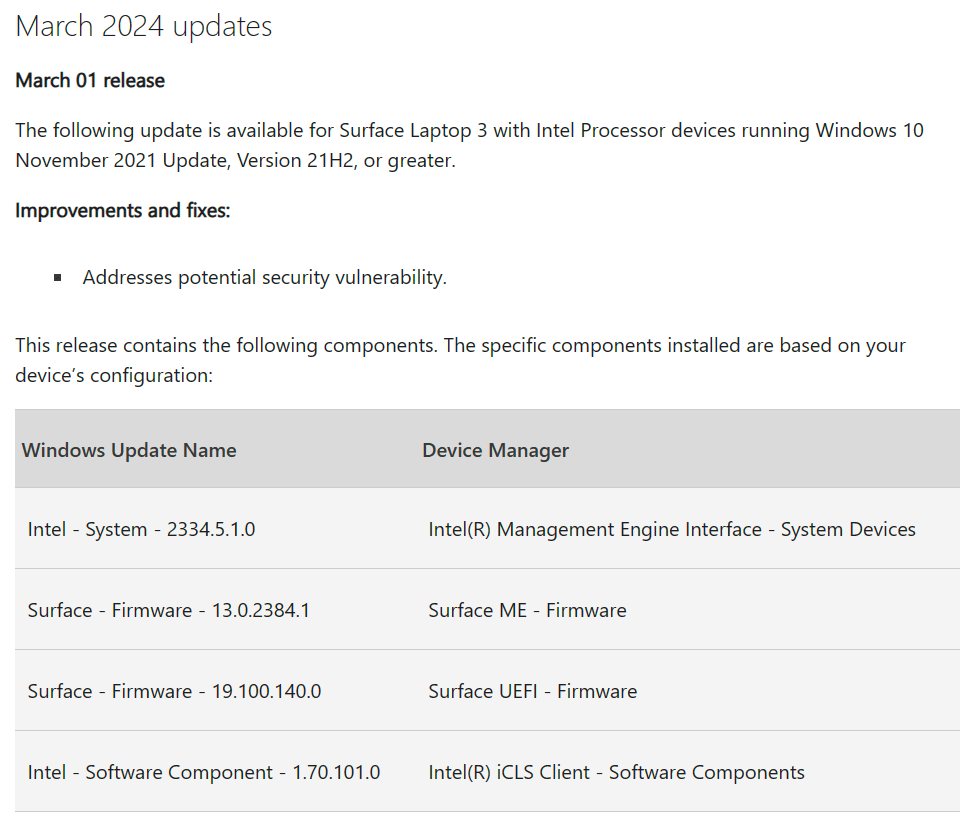
On March 1st Microsoft put out several firmware updates for the Surface Laptop line. For instance, the Surface Laptop 3 received the UEFI Firmware update 19.100.140.0 and ME Firmware 13.0.2384.1. The Surface Laptop 4 received the UEFI Firmware update 24.100.143.0 and ME firmware 15.0.2473. To check your updates Google “Surface Laptop X Update History” as Microsoft has pages confirming to that name scheme for most models.
Microsoft deploys its firmware updates via Windows Updates to both Win10 and Win11. They are, apparently, NOT counted as “driver” updates and instead will follow your Windows Update schedule.
We are finding that when our units process these updates and restart to apply them, the system time (UTC) is rolled back by an hour. Thus, when the machine turns back on after this update, the clock is off by an hour. This is not a Daylight Savings Time issue, it is not a time zone issue, the actual system base time in UTC has been modified. However, this modification was not done by the W32Tm service (this is what controls time syncing and making sure the base time is right) as no logs are found indicating it processed a time change. Rather, this seems to be coming from the UEFI itself as if the update caused the clock to shift.
To fix this: Simply start the W32Time service (typically this is set to manual start and is thus likely not running) with “net start w32time” and then command it to sync with “w32tm /resync /force” – this should force the device to sync immediately as opposed to waiting on its infrequent natural cycle, thus forcing the time to realize it’s out of sync. So far, devices appear to hold steady once the clock is initially forced to realize it’s out of sync. Again, this would likely happen on its own eventually, we are just speeding it up.
The bad news is that starting the service and performing a sync, or even performing a sync from the settings menu, both require admin privileges. The easiest way to get around this for deployment to the masses is something like a simple Company Portal app or Intune Proactive Remediation which processes the above code to start the service and tell it to sync. An app is great for processing on demand the moment you reboot, and the issue occurs. A PR is good for getting it to happen more than once and automatically although, I wouldn’t leave that running for forever.
Microsoft has been contacted but so far not much progress has been made.
What’s the Story?
For those curious how this all played out, continue.
On Monday, March 11th, the first business day after Daylight Savings Time, we had a large number of reports pouring in with devices that were an hour behind. Naturally, we first assumed this was due to DST (Daylight Savings Time) and folks who were simply on some combination of the wrong time zone and/or DST not being enabled. While we had a small handful of folks with this simpler problem, many more, especially those on EST, had the correct time zone and DST settings. It wasn’t long before an admin curiously told their device to sync it’s time and ta-da, the problem was gone suggesting the time had truly been knocked out of sync, not just failing to process a simple offset or change of DST.
But how could that be? Computers rarely get their time a minute out of sync, let alone an exact hour – and to have hundreds occurring all at the same time immediately following the changeover of DST? Was it a Windows bug pertaining to DST? At one point it was floated that Time.Windows.com might have had an east coast server that must have gotten out of sync, hence so many folks on EST specifically seemed off.
Quickly the goose chase began to figure out what was causing this. Windows Updates (like usual) quickly got the finger but we knew our patch cycles wouldn’t have a Windows update going out right now – The last patch Tuesday was February 13th and all phases would have been done with that patch for some time, the next patch Tuesday was tomorrow.
I quickly dove into the data and began looking up the devices of those calling in and quickly noticed an interesting pattern. Everyone had a SL3 or SL4 – no Cloud PC users were calling, and no Dell Laptops were calling in either. Cloud PCs I believe run on some form of Hyper-V and in my experience with the more single-business side of Hyper-V I knew they get their time from the host they run on, so maybe that explained why they never fell out of line. But the Dell devices were odd, why were none of them affected?
Eventually, I wrangled my way to a Log from one of the devices. Specifically, I was after the W32TM log (Windows Logs, Applications and Services Logs, Microsoft, Windows, Time-Service, Operational) to see what time changes were being processed since it seemed like the system clock was really out of sync. If some time server had handed it a bad time and forced it to change by an hour back, we should see it. What I found was disturbing.
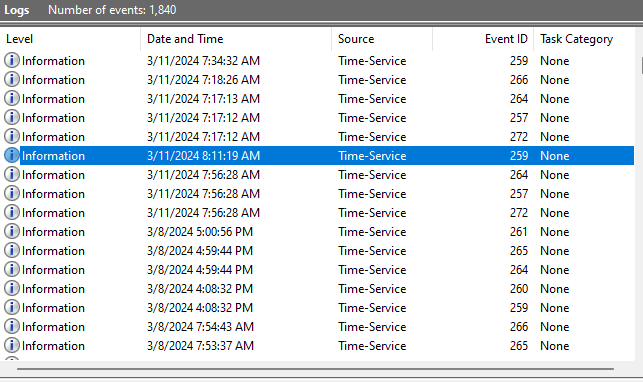
Do you see it? The system turned on at about 7:56 AM, we see logs progressing to about 8:11 AM, then suddenly the clock rolls back to 7:17 AM. Here’s the kicker, the Time-Service never logged a time change or sync or anything.
Later that day when we forced that device to sync manually, we see at 1:44 PM the system received a resync notice (event 266) type 0 (explicit call to resync from an Admin) – that was followed by an event 261, processing a time change. Lo and behold, the machine jumped a full hour forward to get back in sync. So yes, the clock really was somehow knocked off by an hour – but what did it?

The above progress was made late in the day on the 11th as it had taken some time for the issue to gain traction in terms of numbers and concern. When we came back in on the 12th (the day I am writing this) we had new concerns – additional folks who hadn’t had the problem on the 11th were now calling in – what on earth is happening?
This is where I started pulling data for the devices through Log Analytics – yes, I will absolutely tout my own tools, if you too want this data check out my Log Analytics Index in the top right corner!
That morning, I again heard the claim that devices were having this issue after rebooting for some Windows Update, but again that shouldn’t have been possible on our release schedule unless something had been released outside of Patch Tuesday. And to only affect one brand of device…?
Still, I went and looked. Pretty quickly I noticed two Surface Laptop Firmware updates that had applied that morning. Still, they were an hour off from that 8:10-8:20 AM EST timeframe that the device rolled back dur—- Wait, an hour off exactly?
It quickly occurred to me that TimeOfLog is when the system claims it was in UTC that the event occurred. The events indicating an update installed come after Windows boots back up – what if the update processing caused the time to roll back so by the time the unit came up it caused it to make logs that were an hour behind?

So, I went off to see if the machine had indeed rebooted during that timeframe. And sure enough, at 8:11 AM EST, the machine noted it was going to do a restart.

This restart is never followed by a startup event though – and that’s because while it did generate a startup event, the event was tagged as being an hour prior at 7:14 AM because by the time the machine turned on to even generate this base event the clock had already gone back an hour. This was a good 40 minutes before this employee was even getting on for the day, so we knew it was false, their true initial startup of the day didn’t happen until about 7:50 AM.

So yes, the machine turned on for the day at 7:50~ AM, the employee initiated a restart at 8:11 AM, and when the machine turned back on its clock had already rolled back without any time sync event or anything of that nature occurring. The thing that had happened during that reboot though was the processing of several firmware updates. How very suspicious.
So, naturally, I fired up a test Surface Laptop. Just yesterday it had the correct time and I had thought myself unable to replicate the issue so many folks were having, yet upon immediately opening it now had the wrong time. I immediately jumped to Windows Updates and found that it had indeed installed the updated firmware and rebooted on its own late Monday.
So, I pulled out a device that had been off, turned it on, verified it had the correct time, and watched with held breath as it pulled down and installed the update. Sure enough, the moment it came back up the clock was now a perfect hour behind. So, we took another device and repeated it. Then checked the next broken device and confirmed it too had installed the update just moments ago.
It seemed at this point very clear that we had our culprit and an explanation as to why it was just our Surface Laptop audience who was being impacted.
Running back to Log Analytics, I pulled the charts to see where and when these updates were being applied. Much to our annoyance, they started to hit on Friday the 8th but primarily had started applying on Monday the 11th. Confused, I jumped out to learn that these Firmware updates were released on March 1st. Our patch dedication for Windows updates has the first large chunk of 25% going out 7 days after release… That would have been Friday, March 8th. The deadline for these folks would have been Monday…
Oh, it all makes sense now, even if it’s confusing that Windows treats a Surface Laptop Firmware update as just another Windows Update. What a wonderful bug to get on the same weekend as the changeover of DST!

What is the Root Cause?
So, as the above has just led up to…
On March 1st, Microsoft released the Surface Laptop 3 UEFI Firmware update 19.100.140.0 and ME Firmware 13.0.2384.1. Surface Laptop 3 Update History. The Surface Laptop 4 received the UEFI Firmware update 24.100.143.0 and ME firmware 15.0.2473.3. Surface laptop 4 Update History. It is very likely other models of Surface Laptop got a similar update pair on March 1st, my audience is simply limited to models 3 and 4.
Devices download and prep this update, then truly apply it during the next restart. When devices come back up from that restart, their system time will have shifted back an hour. This isn’t just a time zone or DST issue, the UTC itself has shifted back an hour. This can also cause all sorts of chaos with certifications and time-sensitive encryption. You might not be able to login to certain tools and sites until this is fixed.
Keep in mind, the deployment of these Firmware updates is done via Windows Updates to both Win10 and Win11 units. These Firmware Updates will be sent out using the same deferral as normal monthly Windows updates, seemingly not driver updates.

What are the Intermediate Solutions?
As explained in the summary – Simply start the W32Time service (typically this is set to manual start and is thus likely not running) with “net start w32time” and then command it to sync with “w32tm /resync /force” – this should force the device to sync immediately as opposed to waiting on its infrequent natural cycle, thus forcing the time to realize it’s out of sync. So far, devices appear to hold steady once the clock is initially forced to realize it’s out of sync. Again, this would likely happen on its own eventually, we are just speeding it up.
The bad news is that starting the service and performing a sync, or even performing a sync from the settings menu, both require admin privileges. The easiest way to get around this for deployment to the masses is something like a simple Company Portal app or Intune Proactive Remediation which processes the above code to start the service and tell it to sync. An app is great for processing on demand the moment you reboot, and the issue occurs. A PR is good for getting it to happen more than once and automatically although, I wouldn’t leave that running for forever.
What Says Microsoft?
Once all the puzzle pieces clicked early on the afternoon of the 12th EST, we asked our existing case to be moved from SevC to SevA since we had some serious proof to show this was being induced by something Microsoft was pushing and it’s impacting thousands of units – and seemingly could be impacting anyone with this hardware. Unfortunately, there isn’t much to report in terms of progress or positivity thus far.
We have spoken with the Surface team who really didn’t have much to say at the time are trying to transfer to the Windows team. Personally, I feel whoever did the firmware update (if not the Surface team) needs to be dragged in ASAP as this issue appears to be occurring outside the OS, likely as a result of the system clock being modified by the firmware update itself. Windows doesn’t seem to have any indication anywhere that it’s aware the system clock was modified, let alone participation in the event. Allegedly though, the Surface team isn’t the one pushing/creating the Firmware so…
Outside of Microsoft, I’ve heard through the grapevine that other large organizations are seeing this too – but that’s something Microsoft has yet to substantiate. As time progresses and more organizations rings allow these updates to come though, I think the realization will come.
Update 3/13/24:
Some small updates for today – we can confirm at least 26+% of our Surface Laptop audience was impacted by this issue. We know this as we can see what percentage of unique device names have applied one of the four updates (two firmware updates were released for each of the two models we use), and we can see who has chosen to manually execute the time sync fix app. That said, this percentage ignores anyone who ran the sync manually or let the machine self-heal. Self-healing, if the stars aligned, could have happened very rapidly. Additionally, if you rebooted at the end of the day and walked away, there would be a good chance the machine would have self-healed by the time you came back to your machine the next day as the self-heal period appears around 12 hours at most. As such, this number could easily be closer to 30-35%.
There has been little news from Microsoft. Some efforts were made to collect logs but hilariously, the tool provided to achieve this crashes whenever it’s run on a machine that has an actively out-of-sync clock.
Given it is not possible to roll back the firmware (as documented on the Microsoft Surface Laptop X update history pages) to re-test applying it, and the issue is resolved as soon as an automatic sync occurs, we find it unlikely that progress is going to be made on investigating the root cause further.
Update 3/20/24:
Correction to previous updates: Regarding the 3/13 update and the original “What Says Microsoft?” section above, I have a clarification. On the initial call after going to SevA late on the afternoon of 3/12 (which I was not on), two techs from the Microsoft Surface team both confirmed having personally seen the issue on their Microsoft managed Surface devices just that same morning. These same technicians mentioned hearing about the issue “around the web” but gave no further confirmation or information. An additional 3rd representative on the Microsoft side later directly confirmed seeing it on their device at a later date, likely the 13th or 14th. All of these people confirmed having had just applied the firmware update when the issue began and that a time-sync or simply waiting solved the problem.
Unfortunately, since my last update, and despite the above further overwhelming confirmation of issue clarified above, the case failed to make any meaningful progress. While we were transferred to the Windows team, they had us gather logs which were then promptly sent back to the Surface Team (the team we had just been transferred from). These logs were allegedly for the hardware side and would have capture information about the firmware upgrade but, nothing was found in them. Further delving was being considered on the Windows side but, given all information learned and all testing done up to that point, it was clear the issue was specific to Surface Laptops and was occurring as this latest firmware was applied.
More importantly, despite our repeated testing and information, despite the Microsoft techs themselves replicating the issue, despite the loose confirmation from Microsoft of “online grumblings” from other organizations seeing the issue, and despite our own personal confirmations of other organizations seeing the issue, the attitude towards us throughout this process was that this was an issue in our environment and that this could not have possibly been externally induced. Obviously, that’s very frustrating. It’s equally frustrating that all efforts to progress the case forward seemed to require our direct time and involvement despite there being devices which had expressed the issue on Microsoft’s end and right in the hands of the engineers’ working the case.
Making matters worse, there was very little attention given to the case overall. We dropped from SevA to SevB on the 12th to take things down a notch overnight and given us time to gather logs… only for us to then go days without a response as there logging tool failed to run. When we finally did get in contact again, it was immediately clear that our ask for a warm transfer had gone unfulfilled as the new technician on the case was starting at square one. Said new engineer flat out told us that no direct discussion for the transfer had taken place despite this again being directly asked for repeatedly on the call late on the 12th. We knew to ask for it because it’s been a problem for us many times before.
Ultimately, the only thing to be gained from the case at this point given the self-healing nature of the bug was admission of fault and promises to do better in the future from Microsoft. Since there was zero sign of that even being entertained and the case was being treated rather poorly, we opted to close the case.
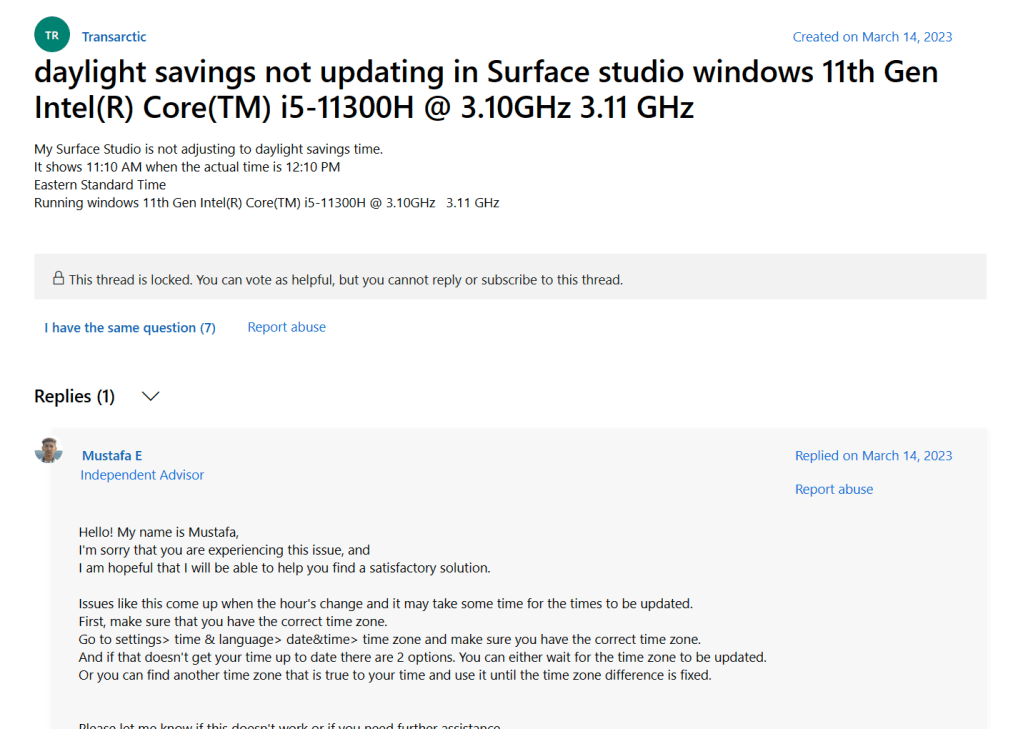
It’s worth noting that in the days following my initial blog there have been additional reports online such as this one (see below as well) on March 14th with Surface hardware users indicating their time had mysteriously reverted an hour with other users seemingly upvoting the question. Sadly, threads regarding this topic were quickly locked preventing anyone from chiming in or seeking clarification or information as to the possibility of a firmware update having just applied. Given the timing and the lack of response which suggests a self-heal occurred or a simple sync worked, it feels safe to call it.
Sadly, that same self-healing nature works against us in terms of finding other confirmations of the issue occurring online. Additionally, as much as I hate to say it, it makes sweeping the issue under the rug all too easy as well.
Disclaimer
The following is the disclaimer that applies to all scripts, functions, one-liners, setup examples, documentation, etc. This disclaimer supersedes any disclaimer included in any script, function, one-liner, article, post, etc.
You running this script/function or following the setup example(s) means you will not blame the author(s) if this breaks your stuff. This script/function/setup-example is provided AS IS without warranty of any kind. Author(s) disclaim all implied warranties including, without limitation, any implied warranties of merchantability or of fitness for a particular purpose. The entire risk arising out of the use or performance of the sample scripts and documentation remains with you. In no event shall author(s) be held liable for any damages whatsoever (including, without limitation, damages for loss of business profits, business interruption, loss of business information, or other pecuniary loss) arising out of the use of or inability to use the script or documentation. Neither this script/function/example/documentation, nor any part of it other than those parts that are explicitly copied from others, may be republished without author(s) express written permission. Author(s) retain the right to alter this disclaimer at any time.
It is entirely up to you and/or your business to understand and evaluate the full direct and indirect consequences of using one of these examples or following this documentation.
The latest version of this disclaimer can be found at: https://azuretothemax.net/disclaimer/
 Azure to the Max