
In this post I hinted to the fact I had found a pair of bugs inside Windows 11 pertaining to notifications while working on this project.
This is the story of the other bug.
As soon as I solved my problem with the Notifications menu, I ran face first into this problem.
As of February 2023, it seems that re-enabling notifications for apps manually via the registry (or more so via scripting) is bugged in Windows 11, but functional in Windows 10.
For instance, my project generated notifications from the “Work or School Account” Windows app. The notification settings for this app live in…
Computer\HKEY_CURRENT_USER\Software\Microsoft\Windows\CurrentVersion\Notifications\Settings\Windows.SystemToast.DeviceManagement
If you open up your Settings menu and head to System, Notifications, assuming you have at some point gotten a notification from the Work or School Account app, you should see this.

Go ahead and turn that off, then refresh the registry key.
What will happen is that this Enabled D-Word is created with a value of 0 (Zero).
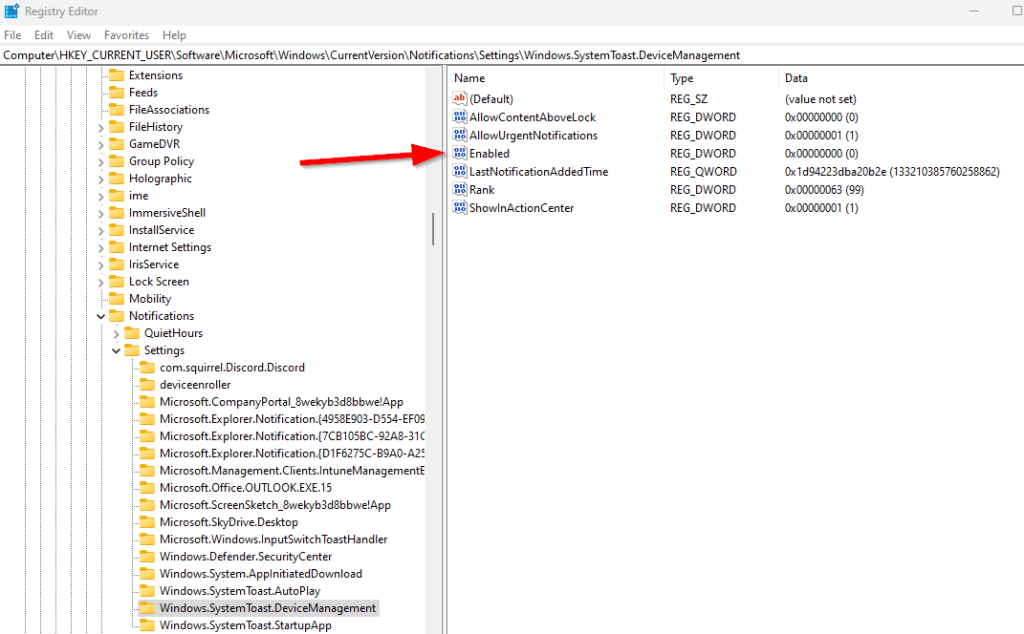
If you delete that D-Word in either operating system, which strangely the default state is to not exist at all, notifications for the app stay disabled according to the Settings menu and do not show.
However, if you change the value to 1 and then close and reopen the Settings menu, Windows 10 and 11 will now reflect that the app is once again enabled for notifications. But, if you try to generate a popup with that app, it will work on Windows 10 and fail on Windows 11. You can reboot the Win11 box, restart explorer, whatever you think of – but it won’t generate notifications again.
The same thing happens when you try this via code with something like this.
#Use this to alter if the notification comes from the company portal or the work account app.
	#$App = "Microsoft.CompanyPortal_8wekyb3d8bbwe!App"
	$App = "Windows.SystemToast.DeviceManagement"

$EnabledKey = get-ItemProperty -path "HKCU:\Software\Microsoft\Windows\CurrentVersion\Notifications\Settings\$($App)\"
$EnabledKey = $EnabledKey.Enabled
if ($EnabledKey -eq "0") {
    #If it exists with value 0, it means it's disabled. Not existing or being 1 is enabled.
    write-host "Warning: $($App) notifications have been silenced! Re-enabling!"
    new-itemproperty -path "HKCU:\Software\Microsoft\Windows\CurrentVersion\Notifications\Settings\$($App)\" -name "Enabled" -value 1 -ErrorAction SilentlyContinue
    set-itemproperty -path "HKCU:\Software\Microsoft\Windows\CurrentVersion\Notifications\Settings\$($App)\" -name "Enabled" -value 1 -ErrorAction SilentlyContinue
}
The way to fix it in Windows 11 – (hilariously) is to turn it off and back on again via the settings menu.
This issue applies to any of the apps in that folder I tried generating notifications through. For some reason, even though both OSs agree the notifications are back on for the app, Windows 11 won’t generate a popup.
I ran a Procmon and ProcExplorer trying to figure out what else could be happening which lead me to a Toast Notification database in my AppData…
C:\Users%username%\AppData\Local\Microsoft\Windows\Notifications\wpndatabase.db
But, the file is encrypted or at least not parseable by any tool I have. My best guess is that this file has settings pertaining to what apps are and are not allowed to generate notifications, and for one reason or another, the setting isn’t getting updated back to enabled.
Is Microsoft Aware?
Yes, I opened a case with them detailing the problem in early February 2023. It’s a few weeks in and so far, there isn’t any news of this being a known issue.
My past experience with findings bugs like this tells me the case will go for 6-9 months before being resolved at the least. Especially given the minimal impact this bug really has.
If there are any significant updates to the problem, I will update this blog.
Update 6/7/23: 4+ Months later… The process Microsoft has is strange to me, but I think readers may find this explanation illuminating. Because this registry key is not documented anywhere as to how it should act, all/any behavior is considered expected behavior by Microsoft. This is confusing because, in my opinion, not knowing how something should act does not make its behavior expected. However, from their point of view, the reason it is “expected” is because there is no expected behavior and thus what it’s doing can’t be unexpected behavior. So, if it’s not unexpected, the only other thing they classify items as is expected.
What that really all boils down to is that this can’t be classified as a bug to them. Because of that, to make the key behave one way or the another, a DCR (Design Change Request) or similar request had to be filed. One day a board will look at that DCR, will determine if they care or not, and if they do it will be put on a road map to get changed one day.
In other words, don’t expect this to work anytime soon, if ever.
Disclaimer
The following is the disclaimer that applies to all scripts, functions, one-liners, setup examples, documentation, etc. This disclaimer supersedes any disclaimer included in any script, function, one-liner, article, post, etc.
You running this script/function or following the setup example(s) means you will not blame the author(s) if this breaks your stuff. This script/function/setup-example is provided AS IS without warranty of any kind. Author(s) disclaim all implied warranties including, without limitation, any implied warranties of merchantability or of fitness for a particular purpose. The entire risk arising out of the use or performance of the sample scripts and documentation remains with you. In no event shall author(s) be held liable for any damages whatsoever (including, without limitation, damages for loss of business profits, business interruption, loss of business information, or other pecuniary loss) arising out of the use of or inability to use the script or documentation. Neither this script/function/example/documentation, nor any part of it other than those parts that are explicitly copied from others, may be republished without author(s) express written permission. Author(s) retain the right to alter this disclaimer at any time.
It is entirely up to you and/or your business to understand and evaluate the full direct and indirect consequences of using one of these examples or following this documentation.
The latest version of this disclaimer can be found at: https://azuretothemax.net/disclaimer/
 Azure to the Max